Bookshare Offers Free Membership to Disabled Veterans Attending School
"Accessible books can break down reading barriers and open a new lifeline to reading to go back to school, learn a new vocation or read for pleasure."
Blog about assistive technology (assistive technology, eLearning, mind mapping, project management, ...) for people with reading, writing ... disabilities, dyslexia, low vision, blindness and other disabilities
"Accessible books can break down reading barriers and open a new lifeline to reading to go back to school, learn a new vocation or read for pleasure."
I had a chance to try the Bookshare Web Reader, just today, and I am very pleased with how it worked. The installation of the Chrome extension was simple to do and by simply logging into a Demo Individual account, I could click on the Read Now link which automatically opened the Bookshare Web Reader. Bookshare Web Reader, has an easy to use tool bar at the top of the Browser which lets you navigate the book and start and stop the Text to Speech engine. By clicking on the Gear icon- it will pop up a dialog box that will allow you to change some of the reading and visual settings. Students can change the look and feel of the book and can determine just how fast they would like the text to be read. Working with the Bookshare Web Reader, I did not see a way to change the speech engine and I am guessing that the Bookshare Web Reader, uses a text to speech engine that is installed with the Web Reader Extension. If I had to make a recommendation, I would like to see a range of speech engines that students can select from in future releases of this product. Overall, Bookshare Web Reader makes accessing Bookshare books easy and straight forward and eliminates the need to have a full blown reading application installed on the computer. As we remove more and more friction from the reading experience, more students will find it second nature to utilize their Bookshare accounts with the Bookshare Web Reader to access their books- and in the end, that is what's really important."Description
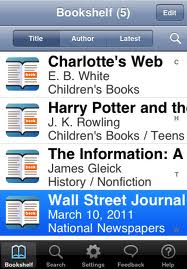
Read2Go is the most accessible DAISY book ereader for iOS. From within the app, you can browse, search, download, and read books directly from Bookshare using your Bookshare membership, as well as read DAISY books from other sources. The app gives you full control over visual choices for font size and color, background and highlighting color, and text-to-speech preferences. Read2Go features word-by-word highlighting for multi-modal reading.
“The Read2Go app will offer many advantages for people who are blind as well as those who have physical or learning disabilities, including many features not available on other DAISY readers for Apple devices.” - Deborah Armstrong, Alternate Media Specialist for DeAnza College in Cupertino, California
Features:
• Direct access to Bookshare
• Fast and seamless browse/search and download of Bookshare books
• Opens encrypted Bookshare books
• Bookshelf organizes your downloaded books
• Bookmarks
• Auto-resume reading position
• Displays Table of Contents
• Full support for all 6 levels of DAISY navigation built in to structure of book
• High-quality Acapela voices, one male and female, for highly natural narration
• Fully compatible with native Apple accessibility features such as VoiceOver
• Synchronized word-by-word highlighting and reading words out loud
• Control of font size up to 70 pts
• Control of text-to-speech audio, either on or off for text-only or text-to-speech mode
• Control of rate of audio
• Reads DAISY 3.0 and 2.02
• iTunes transfer of non-Bookshare DAISY books to your device
• Support books up to 4MB
• Educational institutions wishing to purchase 20 licenses or more can get a discount through the Apple Volume Licensing Program for Education"
DAISYtoEPUB is extremely easy to use and within seconds the file is quickly converted. Once you have used DAISYtoEPUB to convert the file getting the books onto the various aforementioned devices is quite straightforward. This is not the case if you are using the Kindle. While the Kindle supports a number of different eBook formats, unfortunately it does not support ePub. However, not all is lost in the conversion. You see, using the free application Calibre, you can bring the ePub book into the Calibre library and convert it to the Mobi format which is in fact supported by the Kindle. Using Calibre you simply drag the ePub formatted book into the Calibre Library and using the Conversion tool save it as Mobi formatted file. From here I simply plugged my Kindle 3 into the computer and sent the file from the Calibre application to my Kindle 3. It really was that easy. Now when I opened my Kindle I had the NIMAS file in the Kindle and using the text to speech feature the Kindle could access and read the pages, complete with the graphics.
Major Great News about Bookshare.org
We're happy to share incredible news, which will transform Bookshare.org. On Friday, the Office of Special Education Programs of the U.S. federal Department of Education made a major five-year award of $32 million to Bookshare.org. This will further the objectives of the Individuals with Disabilities Education Act (IDEA), by supplying high quality textbooks and educational materials to students with special needs.
This funding is to fully support all schools and students 26 years old and under with qualifying print disabilities in the United States, K-12 and post-secondary. We will provide these students with access to the entire Bookshare.org collection of accessible electronic books and to software for reading those books. As of October 1, 2007, we will cease charging these schools and students anything to join Bookshare.org. We also expect to add over 100,000 new educational titles in high quality DAISY and Braille formats over the next five years, getting students the terrific quality textbooks they need for academic success!
Copyright © 2012 ASSISTIVE TECHNOLOGY BLOG | INVENTIONS FOR PEOPLE WITH DISABILITIES. All rights reserved.
Super SEO created by Blogger Tuts| Distributed by Rocking Templates