Showing posts with label VoiceOver. Show all posts

Voice Dream Reader Updated to Version 3.0: Read PDFs in Original Layout and More


Voice Dream Reader is an app for iPhone, iPad, and iPod Touch that supports people who prefer reading in different ways. Voice Dream can read documents from a number of sources with multiple high quality text-to-speech voices. Users can import PDFs, Word documents, text files, webpages, and even Bookshare books into the app. Once the text is loaded into the app you can listen to it using text-to-speech, highlight the text, search for a specific words or phrases, and get definitions for unknown words. Among many other uses, Voice Dream Reader is a terrific Bookshare book reader for students. Voice Dream also works very well with VoiceOver. Now, with newly released Voice Dream Reader version 3.0, new features have been added that makes the app even more useful.

Up until yesterday evening, Voice Dream only supported text. All images and formatting associated with a file were stripped away. With version 3.0 images and formatting within PDF files are retained. Now you can read a PDF in its original layout. Voice Dream still highlights each word as it is read aloud. It is easy to switch between layout view and text view depending on your preferences. Version 3.0 also includes more customization options. Users now have more control over the colors of the highlighting and spacing of the text. An improved web browser has been added that makes adding text from the web quicker and easier. New Ivona text-to-speech voices are also available for purchase in version 3.0.

With large PDF files page loading is slightly slow, but this problem only occur with very large files and does not effect text view performance.

In future updates image support maybe added for Bookshare books or other document types. I also hope iCloud sync will be added in a future update. At school I read my books on my iPhone and make new annotations, but when I get home and start reading on my iPad the annotations are stuck on the iPhone and I must search for the page that I left off on. iCloud sync would make this process much more seamless.

Voice Dream Reader is a must have app for iOS users with print disabilities or anyone who could benefit from reading with text-to-speech. Voice Dream Reader's well developed features make loading, reading, and annotating text easy. Knowing that the app has a developer that is open to feedback and actively developing new features is an added benefit. Voice Dream Reader costs $9.99 on the App Store. Click here to download the app. There is also a lite version of Voice Dream Reader that allows you to try it before you buy.

Click read more to view screenshots of Voice Dream Reader.


Any Developer Can Now Integrate Fleksy's Accessible Keyboard Into Their iOS App


Fleksy is an alternative keyboard for mobile devices including smartphones, tablets, and even smart watches. Fleksy uses predictive software that will guess which word you meant to type even if you mistype every letter. As long as your close to the right letters Fleksy will be able to correctly guess which word you meant to type. This means you don't even have to look at the keyboard. If Fleksy does make a mistake you can easily swipe through alternative suggestions.

Currently, Apple does not officially support third party keyboards to replace the default keyboard on iOS, but developers can get around this limitation by building an alternative keyboard into their app. Today, Fleksy made it easy for developers to built the Fleksy keyboard into their app. The Fleksy keyboard is now available for any iOS developer who wants to include it in their app. This announcement is very exciting because if developers get on board it will give iOS users the choice of which keyboard to use.

Having Fleksy integrated in apps is also a positive for blind and visually users. Fleksy works well with VoiceOver and because Fleksy is so good at predicting which word you are trying to type being able to see the keyboard is not as important. The Fleksy keyboard is much quicker and easier to type on then the default iOS keyboard especially for VoiceOver users.

Unlike Android were you can download Fleksy and use it will all of you favorite apps, each iOS developer will have to build in support for the keyboard. Hopefully, now that Fleksy is available for all iOS developer Fleksy will become ubiquitous on iOS. If you would like to see Fleksy integrated into one of your favorite apps you could contact the developer and ask for Fleksy integration.

To try out Fleksy download the app for iOS or Android. Fleksy is currently available in select apps such as Launch Center Pro. Click read more below to view images and videos of Fleksy.


iPhone Screenshot 2

iPhone Screenshot 3

Launch Center Pro: Speed Up Common Actions on iOS Devices


blue icon with rocket ship in the middleLaunch Center Pro is an app for iPhone, iPad, and iPod Touch that allows users to launch apps and simple tasks directly from the app. Instead of launching Safari, navigating to the search site, and typing in your search, for instance, Launch Center Pro lets you directly search Google or Wikipedia; Launch Center Pro also can be configured  by users to set up group email, instead of having to type in the email address of each recipient.

Launch Center Pro uses a simple interface to make it easy to simplify some of your common actions and launch them quickly. I frequently text my sister "where are you?" Instead of launching the Messages app, finding my sister's contact, and then typing the message, I created a Launch Center Pro action that sends a text to my sister saying, "where are you?" Now, when I want to text my sister, I just touch the icon for this action and a text saying "where are you?" is on its way to my sister.
,
Creating actions is easy with the built in action composer which gives users the ability to pick pre-made actions for apps they already have installed on their device. The action composer also allows users to customize the icon of the action to make it easier to find.

Launch Center Pro works with a number of apps, but support for more useful actions among third party apps is hit or miss. Some apps such as Prizmo integrate very well with the app allowing you to easily launch actions, but other apps such as Nike+ Running can be opened, but not further interacted with. It would be nice to be able to start a new run in Nike+ via Launch Center, but actions like that requires the developer to build special support for Launch Center Pro into their apps. Click here to view a list of the apps currently supporting Launch Center Pro.

I see Launch Center Pro as a great app for first time iOS users, and other individuals who struggle performing sequential functions. Launch Center Pro can make it easier for first time iOS users learn to use their devices. Instead of learning how to search Google, Wikipedia, Yelp, and Google Maps individually a simple search menu could be made with quick links to search all those services. In terms of accessibility for the blind and visually impaired, Launch Center Pro works well with VoiceOver and supports the Fleksy keyboard which is accessible.

Launch Center Pro costs $4.99 for the iPhone version and $7.99 for the iPad version. Click here to view the app for iPhone and click here to view the app for iPad. Click read more below to view screen shots of Launch Center Pro in action.


App was provided complimentary to reviewer for review 

PDF Expert 5: Well Designed PDF Management App with Text-to-Speech


PDF Expert 5 is a well designed PDF management app for the iPad. The app includes many useful features that allow you to read, edit, and annotate PDF documents easily. Unlike some other feature -rich apps, PDF Expert 5 does not feel cultured. The elegant design makes the app easy to use. PDF Expert is an assistive app because of its text-to-speech integration with the added benefit of extra features.

One caveat, while the app is good for non-disabled and dyslexic users, I would not recommend the app for VoiceOver users because of some VoiceOver problems I have found. Readdle, the maker of the app, should work on fixing these VoiceOver problems so blind and visually impaired can also benefit from the app. 

PDF files can be imported from numerous cloud storage services including Google Drive, Drop Box and SkyDrive or using the "open-in" feature of many other iOS apps. You can also view other file types, but the built in text-to-speech reader is only available for PDF documents. Files can be organized into folders or dragged and dropped into different sections.

PDF Expert's text-to-speech function works with any PDF with digital text. It does not work with PDF documents that have text within images. To read a compatible PDF, turn on text-to-speech in the reading mode menu and then press play. You can start reading at the middle or end of a page by highlighting a word and pressing "read from here." Text is read with the default iOS voice that many may recognize as the voice of Siri. Unfortunately, you cannot purchase additional higher quality voices. The app also requires you to re-enable text-to-speech every time you switch PDF documents. This is inconvenient if you switch are between PDF documents quickly.

Click read more below to continue reading about PDF Expert.

Viewing a PDF document is also a breeze. PDF Expert includes a quick scrolling mode and thumb nail view to allow you to easily navigate large PDFs. You can also change the background to sepia or night for easier viewing.

Aside from the text-to-speech features PDF Expert includes a number of editing and annotation features. Annotation options include highlighting, underlining, shapes, strike-through, stamps, signatures, and text. These annotation options are intuitive to use and you can easily can the color of highlights and other annotations. If you would like to add text to a PDF document you do not need to worry about overlapping any original text because the app automatically wraps your text so it will not overlap. Unfortunately, the app will not read your text annotations back to you using the built in reader, but you can always use the built in Speak Selection feature.  

PDF Expert also includes a review mode which allows you to edit and markup existing PDF documents. To learn more about this feature see the below video.

With PDF Expert's easy to use annotation and editing features and its built in text-to-speech reader PDF Reader is an ideal app for any iPad user who wants increase productivity. PDF Expert 5 is compatible with iPads running iOS 6 or higher and is available for $9.99 in the App Store.


Fantastical Makes Staying Organized Easy


Fantastical 2 is a well designed calender app for the iPhone. Many say Fantastical is the calendar app Apple should have made and I would agree. Just like the default calender app for the iPhone Fantastical is easy to use and syncs with all of your online calenders. But Fantastical includes some great features that makes scheduling, managing, and viewing your calender events easy. Thes are features that the default calender app does not include. Creating events is easy, you can type or speak in natural language to create an event. If you type "lunch with study group at 1 in library" the app will automatically fill the correct information into a new calender event.

Fantastical also includes a five day view that gives a great visual look at your week ahead. The month view also provides more visual information than the default calender app. Fantastical also integrates with Reminders and displays your Reminders along with your calender events. The app includes many features that allows users to customize the look and function of the app.

Fantastical's visual design  and easy event creation feature makes staying organized easy. Fantastical can help people with memory loss or executive functioning difficulty to stay organized. With Fantastical you only have to check one app to keep up with your calender and reminders.

Fantastical's latest update improved VoiceOver compatibility, but there remains some very minor VoiceOver issues. These issues make learning how to use the app slightly harder for VoiceOver users, but once familiar with the function of the app VoiceOver users should have no problem using the app. The developer has expressed that they take accessibility seriously which is great to hear.

Watch the above video to see Fantastical 2 in action and click read more below to view screenshots of the app. Fantastical 2 for iPhone costs $2.99 on the App Store.


App was provided complimentary to reviewer

New in iOS 7: Ask Siri to Turn on VoiceOver and other Accessibility Settings


iOS 7 is Apple’s new operating system for iPhone, iPad, and iPod Touch. iOS 7 includes a complete redesigned look and many new features. Siri in iOS 7 has learned some new tricks that can benefit users of VoiceOver and the other built in accessibility features that iOS offers. The feature allows you to ask Siri to turn on and off different accessibility settings using your voice. For example you can say, "turn on VoiceOver" and Siri will turn on VoiceOver in seconds. This feature will make iOS accessibility features easier to find and access. If a VoiceOver user is presented with an iOS device with VoiceOver turned off and triple click home disabled they could use this new feature to ask Siri to turn on VoiceOver. Besides accessibility settings Siri can also change other settings such as brightness, Bluetooth, and Wi-Fi. 

Reminder: Apple to Preview "The Future of iOS and OS X" Tomorrow


Apple's World Wide Developer Conference (WWDC) starts Monday June 10th. At the event Apple will detail "the future of iOS and OS X." Apple is a leader in integrated accessibility with their VoiceOver screen reader and numerous other accessibility features such as Guided Access, Speak Selection, Zoom, and Assistive Touch. That being said Apple still needs to improve their accessibility features to remain a leader. New accessibility features have routinely been added to new versions of iOS. Last year, Apple added Guided Access along with other accessibility improvements. A new version of iOS is exciting not only because of the cool mainstream features but the lesser known, but no less important accessibility features that make the devices usable for so many. Make sure to visit The Assistive Technology Blog after the Keynote for all the iOS 7 and OS X accessibility news.

In the meantime check out my iOS 7 Wish List video below.


Kindle App For iOS Updated With VoiceOver Support


Today Amazon updated their Kindle iOS app with VoiceOver support. VoiceOver  is a gesture controlled screen reader for the iPhone, iPad, and iPod Touch designed to help the blind and visually impaired. The text-to-speech feature can benefit people with dyslexia as well. Amazon describes the new features as follows,
"Accessibility features make it easier for blind and visually impaired customers to navigate their Kindle libraries, read & interact with books, and more. Enable VoiceOver in your device settings to begin."
VoiceOver support for the Kindle app comes shortly after the Nook app was updated with VoiceOver support. Despite VoiceOver support it is possible that certain books may have accessibility issues that make them inaccessible. Irronically, the Kindle iOS app is now more accessible for the blind and vissually impaired than physical Kindles. Kindle for iOS is avalible as a free update in the App Store.

Click read more to view screenshots of the Kindle app.


Quizlet Flashcard App: Create, Share, and Study


Quizlet is a website where users can create, share, and study flashcards. Users can make a study set on the internet and then study them on a computer or using the free Quizlet iOS app. The app is compatible with iPhone and iPod touch. Teachers can also make a study sets for their classes. Quizlet also offers pre-made flashcard sets for popular vocabulary books, SAT vocabulary, and more. Flashcards can also include images to aid in studying. Once the study set is open you can view the terms in list mode or in flashcard mode. Watch the video above to learn more. Both modes include speak buttons which speak the terms in a high quality text-to-speech voice. Quizlet is compatible with Apple's VoiceOver. Click here to download the free app.


Click read more below to view screenshots of the app in action.


BrailleTouch App Allows Fast Braille Typing on iPhone


BrailleTouch is a new app for the iPhone and iPod Touch that allows users to type using braille. Click here to download the app. BrailleTouch is designed for the blind and visually impaired. The app uses the familiar six key braille and simple swipe gestures to enter text. The app is used in landscape with the devices touch screen facing away from you. Three of the six keys are on the left side and the other three are on the right side. By swyping with one finger you can add a space or delete a letter. BrailleTouch can also speak the characters and/or words as you type. BrailleTouch works well and is the first app of its kind but it cannot be used to replace the default keyboard for any other apps. This means that in order to use the text you typed using BrailleTouch you must copy and paste it into other apps. BrailleTouch is free to download and try but costs $19.99 to unlock the ability to copy and paste the text.

Click read more below to view screenshots of BrailleTouch.


iTunes 11 Feature Helps Visually Impaired Redeem Gift Cards


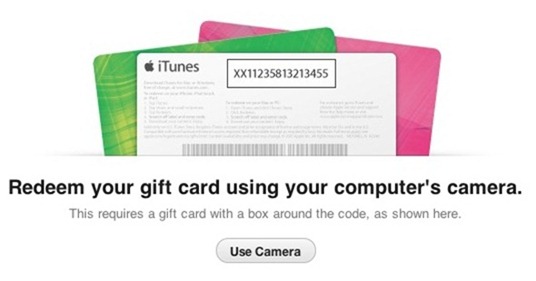
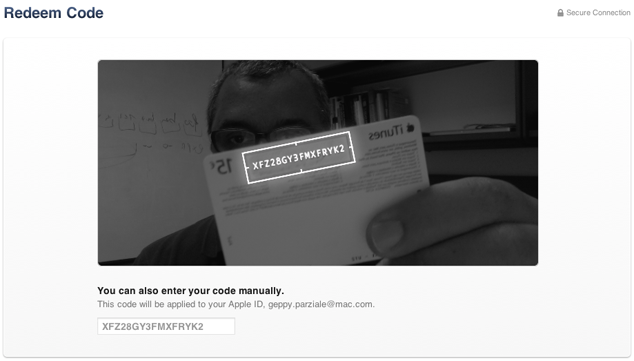
A feature in Apple's iTunes 11 allows you to scan a gift card code using your computer's camera. The feature is particularly intriguing for the blind, visually impaired and for dyslexics. While it may be inconvenient for most people to type the 16 digit code, it is impossible for users who are blind or visually impaired, and can be a struggle for some dyslexics. To use the feature position the gift card in front of the computer's camera. For people with visual impairments VoiceOver, Apple's built in screen reader on your Mac will help you frame the card in the picture. Then iTunes recognizes the code and credits the money to your iTunes account. This feature makes it possible for the blind and visually impaired to easily and independently redeem iTunes gift cards. Maybe this cool scanning feature will make its way to iOS in the near future.

Click read more below to view pictures of the scanning feature in action.