Showing posts with label apple accessibility. Show all posts

Voice Dream Reader Updated to Version 3.0: Read PDFs in Original Layout and More


Voice Dream Reader is an app for iPhone, iPad, and iPod Touch that supports people who prefer reading in different ways. Voice Dream can read documents from a number of sources with multiple high quality text-to-speech voices. Users can import PDFs, Word documents, text files, webpages, and even Bookshare books into the app. Once the text is loaded into the app you can listen to it using text-to-speech, highlight the text, search for a specific words or phrases, and get definitions for unknown words. Among many other uses, Voice Dream Reader is a terrific Bookshare book reader for students. Voice Dream also works very well with VoiceOver. Now, with newly released Voice Dream Reader version 3.0, new features have been added that makes the app even more useful.

Up until yesterday evening, Voice Dream only supported text. All images and formatting associated with a file were stripped away. With version 3.0 images and formatting within PDF files are retained. Now you can read a PDF in its original layout. Voice Dream still highlights each word as it is read aloud. It is easy to switch between layout view and text view depending on your preferences. Version 3.0 also includes more customization options. Users now have more control over the colors of the highlighting and spacing of the text. An improved web browser has been added that makes adding text from the web quicker and easier. New Ivona text-to-speech voices are also available for purchase in version 3.0.

With large PDF files page loading is slightly slow, but this problem only occur with very large files and does not effect text view performance.

In future updates image support maybe added for Bookshare books or other document types. I also hope iCloud sync will be added in a future update. At school I read my books on my iPhone and make new annotations, but when I get home and start reading on my iPad the annotations are stuck on the iPhone and I must search for the page that I left off on. iCloud sync would make this process much more seamless.

Voice Dream Reader is a must have app for iOS users with print disabilities or anyone who could benefit from reading with text-to-speech. Voice Dream Reader's well developed features make loading, reading, and annotating text easy. Knowing that the app has a developer that is open to feedback and actively developing new features is an added benefit. Voice Dream Reader costs $9.99 on the App Store. Click here to download the app. There is also a lite version of Voice Dream Reader that allows you to try it before you buy.

Click read more to view screenshots of Voice Dream Reader.


Apple Releases iOS 7.1 with Numerous Accessibility Tweaks


Today, Apple released iOS 7.1 with numerous accessibility improvements. While these features are not as exciting as the accessibility features added in major releases of iOS they still offer advantages for many users. Most of the improvements focus on making the new iOS interface easier to see for people with visual impairments. Turning on bold text now makes the keyboard, calculator, and in app icons bold in addition to text. A new option found under the accessibility menu allows users to turn on button shapes which makes it easier to distinguish text from buttons. In addition to limiting the parallax effect, reduce motion now limits multitasking animations and animations in the weather and messages apps. iOS 7.1 also allows users to darken colors used in apps to make them easier to view and increase the white point of the display to cut down on glare.

Button Shapes
iOS 7.1 also includes a number of VoiceOver bug fixes, but some are still present in iOS 7.1. In addition to accessibility improvements iOS 7.1 includes an important stability improvement that limits a crashing issue that was present in iOS 7. Among other improvements, Touch ID finger print scanning accuracy is also improved for iPhone 5s users.

Users can download iOS 7.1 by going to settings > general > software update.

What's on my iPad? Assistive Apps I Use as a Dyslexic Student


As a dyslexic high school student my iPad, with a number of assistive apps, has become a very valuable tool. With my iPad I can read and fill out a PDF using text-to-speech, read a book with Voice Dream Reader, or map out my ideas with Inspiration Maps. The iPad mini is a perfect size for my needs allowing me to read sitting up, or reclining comfortably while listening to a book. Before I got the iPad I would either be tied to a computer to read using text-to-speech, or reading on the tiny screen of my iPhone. Here's a list of my favorite iPad apps and how I use them to help me both in and out of the classroom.


Voice Dream Reader is a text-to-speech reading app that allows users to read a wide variety of files through the app. The app includes the ability to buy very high quality text-to-speech voices for use with the app. Voice Dream Reader allows you to highlight  important parts of a passage as you read along.. One of my favorite features is the ability to download and read Bookshare books from within the app. Currently  Voice Dream Reader does not support  Bookshare books with images, but hopefully will add that feature in the near future. In all Voice Dream Reader is a must have for anyone who prefers reading with text-to-speech.

Click here to read a full review of Voice Dream Reader.


Read2Go is another app for reading Bookshare books. Bookshare provides accessible digital books to members. Using Read2Go users to keep their books at their finger tips all the time. The app has a choice of two text-to-speech voices. While Read2Go does not have as many features as Voice Dream Reader the support it has for books with images is a plus.

Click here to read more about Read2Go.


The free Learning Ally Audio app allows Learning Ally members to download and listen to their audio books on the go. The app has useful features such as bookmarking and playback is easy to control and customize. Learning Ally is starting to add digital text to some of their books so users can follow along with the text while listening to the human narrated audio book.

Click here for more information about Learning Ally Audio app.

Click read more below to learn about many more great apps.


PDF Expert 5 is a new addition to my iPad home screen. The app includes polished annotation, editing, and management with easy to use built in text-to-speech. Using the app I am able to read a PDF worksheet with text-to-speech and complete the worksheet with the annotation features. PDF Expert can also connect to your Google Drive or Dropbox for easy upload and download.

Click here for a complete look at PDF Expert 5 from Readdle.


Inspiration Maps is a mind mapping app perfect for pre-writing and getting your ideas out onto paper. Inspiration Maps makes it easy to make great looking webs and outlines on the go. I like using Inspiration Maps to get my ideas flowing when I have to write about a difficult topic. Inspiration Maps also has a more kid friendly version called Kidspiration Maps.

Click here to learn more about Inspiration Maps.


Prizmo is one of my all time favorite apps. With Prizmo you can take a picture of text in a document and Prizmo will recognize the text using optical character recognition (OCR) then the app can read the text back to you using text-to-speech. Prizmo also is a great scanner allowing you to snap a picture of a document and save or share it as a PDF.

Click here if you want to learn more about Prizmo.

Apple iWork (Pages, Numbers, Keynote) - Free with new device


Apple's iWork suit is the Apple equivalent of Microsoft Office for the iPad. While Microsoft Office has more features iWork has everything you need to complete basic tasks. These apps allow you to use your iPad for productivity and adds a lot of functionality to your device.


Podcasts is an app for managing and listening to Podcasts. Podcasts are audio or video shows from a number of provides. Podcasts can be put out by well known news organizations such as NPR, New York Times, ABC News, CNN, and many other lesser know sources. As an auditory learner I enjoy listening to Podcasts to learn more about topics that interest me.

Click here for more information about Podcasts.


iTunes U is another Apple app that allows you to explore and follow classes from various institutions that interest you. You can follow a history class at Yale or a computer science class an Stanford. Once you subscribe to a course you can view videos of the lectures, PDFs of the slide shows, and other course material. iTunes U is an easy way to learn new things from home on the iPad.

Click here for more on the iTunes U app.


iBooks is reading app from Apple. The app is somewhat sparse in terms of accessibility features so I tend to use it sparingly. Unfortunately, iBooks is difficult to use for people who prefer text-to-speech with synchronized highlighting. Speak Selection allows iBooks users to read one page at a time with text-to-speech and synchronized highlighting, but users must highlight each page manually in order to have Speak Selection read it. VoiceOver is another option for text-to-speech within iBooks, but it does not include the synchronized highlighting that is helpful to many with dyslexia. 

Apple Reminders - Included


Reminders is an app that comes included with the iPad. It is a simple way to keep track of my homework assignments and other tasks. With Reminders I can enter a homework assignment on my iPhone and it appears on my computer and iPad as well. 


Quizlet is a website where users can create, share, and study flashcards. Users can make a study set on the internet and then study them on a computer or using the free Quizlet iOS appTeachers can also make a study sets for their classes. Quizlet also offers pre-made flashcard sets for popular vocabulary books, SAT vocabulary, and more. Flashcards can also include images to aid in studying. Once the study set is open you can view the terms in list mode or in flashcard mode. Quizlet includes text-to-speech allowing users to hear the content of their flashcards. The text-to-speech helps me learn my vocabulary words more quickly and also helps me pronounce the words correctly.


WolframAlpha is a powerful reference services that can answer complex queries as well as provide useful graphs and visuals. I like using WolframAlpha to double check my math calculations and to research interesting topics. You can also use WolframAlpha from a web browser by visiting WolframAlpha.com.

Click here for more information about WolframAlpha.


The Livescribe+ app is the brains of the Livescribe 3 smartpen. The pen sends your notes to the app over Bluetooth and then processes the handwriting and turns it into digital text. The app makes it easy to review notes in a page view or list view. Because the app turns handwriting into digital text, it is simple and fast to search through your notebook. You can search by keyword and easily find all associated notes. Once your handwriting has been converted to digital text you can use the built in iOS Speak Selection feature to have your note read aloud with text-to-speech.

Click here to learn all about the Livescribe 3 Smartpen.

Kurzweil 3000-firefly - Free


Kurzweil 3000-firefly is a app that allows you to view and read Kurzweil documents that you store online. The app is free for users that have a Kurzweil 3000-firefly licence. Users can save a Kurzweil document to firefly from their computers and then view and read the document using text-to-speech. The service is helpful for people that use Kurzweil frequently and want to read documents while on the go. Firefly can also make sharing Kurzweil documents to multiple people much easier.

Click here to read more about Kurzweil 3000-firefly.

Made for iPhone Hearing Aids to be Avalible in Early 2014


Apple announced Made for iPhone Hearing Aids along side iOS 6 now the first Made for iPhone Hearing Aids are set for release. Apple's partnership with GN ReSound helped to create the LiNX hearing aid. The LiNX connects directly to the iPhone using a special wireless technology. Unlike other hearing aids the LiNX does not use an intermediary device to communicate with the iPhone. Apple says the following about Made for iPhone Hearing Aids on their accessibility webpage.
"Apple is working with top manufacturers to introduce hearing aids designed specifically for iPhone. They’ll deliver a power-efficient, high-quality digital audio experience, and will allow you to manage your hearing aid right from your iPhone. Just look for the Made for iPhone label. Explore the FCC's hearing-aid compatibility (HAC) ratings of iPhone."
A companion app allows users to change settings directly from their iPhone. The LiNX will cost $3,000 and will be available in 2014. 

New in iOS 7 and Android KitKat: Customize Subtitles and Captioning


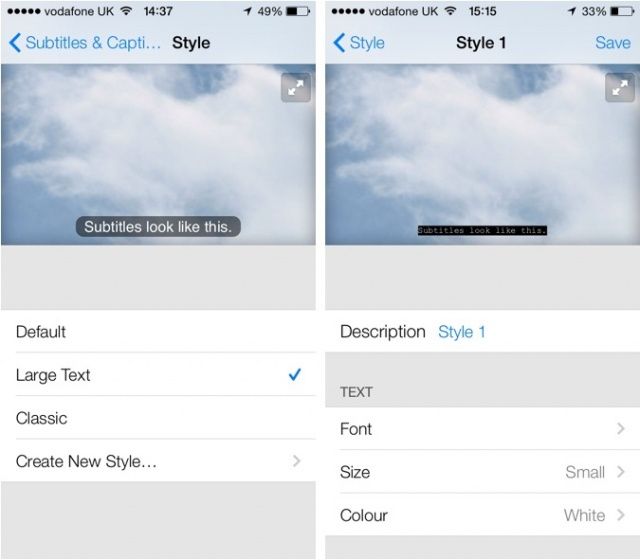
Both iOS 7 and Android KitKat include the ability to customize captions. Now both major mobile operating systems include the ability to customize movie and video subtitles system wide.. For iOS, the customization settings are under Settings > General > Accessibility > Subtitles & Captioning. From that menu you are able to change the appearance of subtitles of any video played through the default iOS video player. There are many options for customization including font, font size, font color, and background color. Android includes a similar feature that can also be accessed in the settings menu. These options are a welcome addition to mobile devices and can make subtitles much easier to see. It is great to see both Apple and Google improving accessibility on their mobile products.

Apple's Announcements Impact on Accessibility


This week Apple announced a variety of new hardware and software products at media event. While Apple executives didn't devote stage time to accessibility announcements as they have in years past, the announcements still impact accessibility and assistive technology.

Mac

Apple previewed OS X Mavericks at their World Wide Developers Conference (WWDC) in June. This week Apple released the Mac operating system to the public and announced that it would be a free update. Like iOS 7, Mavericks includes some exciting accessibility improvements including enhanced dictation and Switch Control. Click to read more about each new feature.

iPad
The main focus of the event was updated iPads. Apple released a new full size iPad named iPad Air. The iPad Air is considerably thinner and lighter than the previous full size iPad. In addition to the slimmer design Apple included the new A7 processor which increases performance. The iPad mini was also updated to include a higher quality retina display and is now called the iPad mini with Retina display. Notably, the new iPads don't include Apple's new Touch ID finger print sensor that debut on the iPhone 5s.

Updated Apps

Apple updated their iLife and iWork software for both the Mac and iOS devices. The updates have some useful new features, but I have not found any new accessibility features in these updates. Notably, Apple's education focused iOS apps iBooks and iTunes U were not updated. I'm hopeful that these apps will be updated soon and include new features. In particular, I hope Apple adds improved text-to-speech integration for iBooks. In particular I hope a "read" or "speak" button will be added to allow continuous text-to-speech with highlighting for all books. Currently continuous text-to-speech with highlighting is not possible in iBooks. 

iOS 7.0.3

iOS 7.0.3 is a minor update to iOS 7 but the new release includes a few accessibility improvements. In iOS 7.0.3 the reduce motion accessibility setting decreases navigation animations. This is designed to limit motion sickness that some users reported after updating to iOS 7. iOS 7.0.3 also includes VoiceOver fixes for a sensitivity issue that was present in previous versions of iOS 7.

Apple Announces October 22th Event Likely to Foucs on new iPads and More


Today Apple sent invitations to members of the media for an October 22th event. The event comes just weeks after the release of the iPhone 5s and iPhone 5c. Rumors have suggested that the event will focus on an updated full sized iPad and an updated iPad mini. The full size iPad will likely feature a new design with smaller side bezels similar to the iPad mini's design. It is also possible that the new iPad models will include some of the new features found on Apple's latest iPhone possibly even the Touch ID finger print sensor. Of course all of this remains speculative until Apple officially confirms the details. If you are in the market for a new iPad it is difinitely recommended to wait and see what Apple will announce next Tuesday.

New in iOS 7: Redeem iTunes Gift Cards with the Camera


Apple’s new mobile operating system for iPhone, iPad, and iPod Touch includes the ability to redeem iTunes gift cards with the camera instead of manually typing long codes. To redeem a gift card with the camera go to the iTunes Store, App Store, or iBooks Store and hit redeem at the bottom of the featured page. Then choose to redeem the gift card with the camera. You can use either the front facing or rear facing camera. To redeem the gift card just point the camera at the back of the gift card and the code is automatically redeemed. This new feature makes it possible for the blind and visually impaired to redeem gift cards without sighted assistance. Also, iOS 7 eliminates the need for sighted users to type in long and complicated codes. iOS 7 is available now for iPhone, iPad, and iPod Touch.

Apple Releases iOS 7 With New Accessibility Features

Today Apple released iOS 7, a new version of the operating system for iPhone, iPad, and iPod Touch. iOS 7 includes a number of new features including a totally redesigned interface. iOS 7 also includes a number of new accessibility features that will benefit users with disabilities. The operating system also builds on existing accessibility features such as Speak Selection, VoiceOver, Guided Access, Assistive Touch, and Zoom. Click on a link to learn more about the corresponding feature. It is exciting that Apple has continued its commitment to accessibility in every new iOS release. Among the new accessibility features are system wide large fonts, customizable captioning, Siri improvements, Switch Control, and more. All of these features are available to all iOS 7 users automatically. To learn more about these features as more information becomes available look for posts titled "new in iOS 7."

iOS 7 is available for iPhone 4 and newer, iPad 2 and newer, and the fifth generation iPod Touch. To download iOS 7 go to Settings > General > Software Update.

The Touch ID Fingerprint Sensor on the New iPhone 5s Has Major Accessibility Implications


Today Apple announced the iPhone 5s with a fingerprint sensor dubbed Touch ID. Touch ID allows users to unlock their iPhone and purchase iTunes content using just their fingerprint. The Touch ID sensor is located under the home button. This feature allows all users to secure their iPhone without typing in a passcode each and every time. This will encourage more users to secure their phone and decrease frustration when they enter the passcode incorrectly.

While the new Touch ID sensor is not exclusively an accessibility feature it will have large implications for some disabled users. Blind and visually impaired users will be one group to benefit greatly. These users use the built in VoiceOver screen reader to navigate the iPhone. Without being able to see the screen typing in even a simple four digit passcode with VoiceOver may be time consuming compared to a sighted user typing in the same passcode. (Don't take this the wrong way, VoiceOver is a fantastic feature that gives blind and visually impaired users access to their devices. It just takes longer to enter information). With the new Touch ID sensor VoiceOver users will be able to almost instantly unlock their iPhone just as quickly as any other sighted user.

The Touch ID sensor will also benefit people with cognitive disabilities who are unable to remember a passcode, but still need to protect their device. People with cognitive disabilities can benefit greatly from various iPhone apps, but may not be able to remember a passcode to protect their device. Now with the Touch ID sensor cognitively impaired users can easily unlock their iPhone with their finger.  It eliminates the fear and possibility of forgetting your passcode.

The iPhone 5s will also include iOS 7 which includes new accessibility features. Click here to learn more about iOS 7 accessibility. Click read more below to view videos about the iPhone 5s.


iOS 7 Accessibility Overview: What We Know Now

This year iOS accessibility did not get the prime-time attention that it did during last year's WWDC Keynote, but iOS 7 still includes many new accessibility features. When iOS 7 launches in the fall, users of all abilities will find beneficial features. iOS 7 is still in beta so Apple can always add or remove features before the final release to the public. Through the Apple Keynote and other sources a number of accessibility features have been detailed. These new features will improve on current accessibility features such as VoiceOver, Guided Access, Speech Selection, Assistive Touch, and Zoom. This post will be updated as new information becomes available on iOS 7 accessibility.

Click read more to learn about iOS 7 accessibility.

Customize Captioning

from CultofMac.com

iOS 7 will also allow users customization the font and size of subtitles. Currently the subtitles are small and can be hard to read particularly on the iPhone and iPod touch. In iOS 7 the font, size, and color of subtitles can be changed.

Use Camera to Redeem iTunes Gift Card

from iDownloadblog

One of the coolest features for the blind and visually impaired in iOS 7 is the ability to redeem iTunes gift cards using the devices camera. This will allow users who cannot read the small codes printed on the back of iTunes gift cards to redeem their gift cards easily without assistance. This feature originally debut on iTunes 11 on the Mac.

Siri Improvements


Along with updated Siri functionality Apple has added multiple high quality text-to-speech voices. The voices are both male and female and sound much better than the previous Siri voice. It is not clear is these new voices will be available for VoiceOver and Speak Selection or exclusive to Siri.

Switch Control

from AppAdvice.com

According to AppAdvice iOS 7 beta 2 also includes Switch Control. Little is known about the feature but the name suggests that iOS 7 will allow a user to control their device through switches. These switches are designed for people with physical disabilities who may only be able to activate one or two large switches. A separate post on MacRumors say that iOS 7 will allow users to control their device with head movements. From the screenshot it appears that head movement could be part of Switch Control and be used to activate a switch but it is unclear at this time. Below is a video of Switch Control.


New APIs to Help Developers Build More Accessible Apps

Last year in iOS 6 Apple included Guided Access which could put the device in a single app mode. Guided Access was targeted for users with autism. This year iOS 7 will add a Guided Access API for developers. This feature will allow developers to build apps that integrate deeply with Guided Access to give users more control of Guided Access.

iOS 7 is also reported to include new APIs to allow developers to detect blinking and smiling which could help disabled users control their device. It has also been reported on 9to5mac that Apple will include a text-to-speech API which would allow developers to easily integrate text-to-speech into their app.

iOS 7 is looking like a great release for all iOS users including users with disabilities. Apple is likely to change feature until iOS 7 is released to the public in the fall.

Apple To Preview Updated OS X and iOS at WWDC Likely With New Accessibility Features

WWDC Logo
Today Apple announced that they will hold their annual WWDC (World Wide Developer Conference) on June 10th at the Moscone West in San Francisco. WWDC 2013 is expected to showcase iOS 7 and OS X 10.9. iOS is Apple's operating system for iPhone, iPad, and iPod Touch and OS X is Apple's operating system for Mac computers. This year's WWDC keynote will give users a preview of the new features coming to their Apple devices in the coming months.

Last year at WWDC Apple previewed iOS 6 with new accessibility features including Guided Access, Speak Selection with highlighting, Assistive Touch improvements, and much more. Apple devoted a portion of their WWDC 2012 keynote to iOS accessibility. These features were added to the already robust accessibility features for iOS. If Apple sticks to the pattern as they have in years past iOS 7 will also include new and improved accessibility features. OS X 10.9 is rumored to include Siri integration among other features. WWDC will follow Google I/O by a little more than a month.

To learn more about iOS 6 and OS X 10.8 Mountain Lion.


Apple To Hold Special Event On October 23

colorful design with white apple logo at bottom

Apple issued invitations to select members of the media for an October 23 special event. The event will begin at 10 AM pacific. Apple is rumored to announce a new smaller iPad dubbed iPad Mini and possibly updated Macs. If the rumors are to be believed an iPad Mini could be a great device for education because of its smaller size and rumored lower price point. No matter what Apple announces on the 23rd chances are that it will have accessibility features to make it usable for those with disabilities. Check back on the 23rd to learn about Apple's announcement and the accessibility implications.

iOS 6: Guided Access Accessibility Feature

Apple's upcoming iOS 6 software update for iPhone, iPad and iPod Touch will include a great accessibility feature called Guided Access. Guided Access will allow teachers and parents to control their children's device usage. For example, you will be able to lock app controls such as settings. This will ensure that children will not change settings or use distracting features. This feature will benefit people with autism. Guided Access will also allow teachers to give tests on the iPad or iPhone and ensure that the students will not be able to search for the answers or exit the test app. Guided Access will allow museums to use iPads as displays without worrying about people changing to another app.

iOS 6 will be released in the fall. To learn more about iOS 6 click here.