Showing posts with label bluetooth. Show all posts

Great Day Presenting to Undergraduate Students Majoring in Education

It was really great being able to share the work that I am doing with undergraduate students who are majoring in Education at the College of St. Elizabeth. Today was their annual educational association conference and I had a chance to share the work I am doing using iPads in the classroom. I had a chance to demonstrate a number of new and innovative technologies that in some way all connect to the iPad. The students got a real kick out of the demonstration I did with the iPevo Wireless Station and the iPevo Ziggi HD document camera. I placed three quarters under IPevo Ziggi HD camera and then handed three groups of students an iPad with the iPevo Whiteboard app installed  Once the students logged into the iPevo Wireless network they were all able to see the three quarters and annotate on top of the image. I shared with the group how this strategy and approach could be used as students set off to solve real world problems having access to high quality video feeds. In my presentation, I next demonstrated the Mighty Scope Connect, a handheld wireless digital microscope from Aven, Inc. The Mighty Scope Connect, is an impressive microscope that easily creates an adhoc wireless network with your iPad and utilizing their Wi-Viewer app it wirelessly sends the image to the iPad. The quality of the image under the microscope was really crisp and clear and the future teachers could think of some interesting ways to utilize this tool in the classroom. Just like the iPevo solution, students could log into the Mighty Scope Connect network and view the image in stunning detail on their iPads using the supplied app.  I plan on doing a more in-depth review of theMighty Scope Connect in another blog post. As part of my presentation I also demonstrated probeware from Pasco and how it could be utilized with the iPad using a Bluetooth connection. Using the PasPort Airlink 2 connected to a Temperature, Sound Level, & Light probe, I was able to demonstrate how the device could capture the light level in the room in real time and display it on the iPad. It was enjoyable day and the students were very excited to learn about all of the innovative technologies that are out there and find their way to the classroom.

Created with Haiku Deck, the free presentation app for iPad

HumanWare Communicator a Great Tool For Deaf-Blind Communication


HumanWare recently released the HumanWare Communicator app for iOS devices. The app is designed to make communication between a deaf-blind person and a sighted person possible.When the conversation is started an introduction is displayed for the sighted user to read. The deaf-blind person uses a Bluetooth braille display to type a message to a sighted person, this message appears on the screen of the iPhone, iPad or iPod Touch.  Then the sighted user can respond using the virtual keyboard and the message will appear on the refreshable braille display. The conversation can then go back and forth with the deaf-blind person typing on the braille display and the sighted user typing on the device's virtual keyboard.

HumanWare describes the app as follows,
"The HumanWare Communicator application is intended to establish a text conversation, through a chat window, between a deaf-blind person and a sighted person. All interaction appears both on the deaf-blind person's refreshable Braille display, as well as visually on the screen of the iOS device."
The HumanWare communicator is available in the App Store for $99.99 for devices running iOS 5.1 or higher. To view screen shots of the HumanWare Communicator app in action click read more below.


IPevo Delivers with the IPEVO Typi Folio Case


I have always been impressed with the iPevo Company and the innovative products that they develop for computers and iPad. I had a chance this past week to review the  IPEVO Typi Folio Case which is a well constructed portfolio type of case for the iPad 2 with a Bluetooth Wireless keyboard. The case is made of soft leather and felt which is light weight, slim and attractive. To get started using the IPEVO Typi Folio Case just slide your iPad 2 into the case and press the Bluetooth connection button to pair  the keyboard. Pairing the Bluetooth keyboard was a breeze and within seconds I was using the keyboard to type a memo. The top row of the keyboard has dedicated keys to make it easy to navigate, adjust the volume, and play videos. The IPEVO Typi Folio Case, Bluetooth keyboard is comfortable to use and has a region below the keyboard which acts as a a palm rest. The Bluetooth keyboard has a magnet base which keeps the keyboard in position but if you like you can easily detach it and use it away from the base. The IPEVO Typi Folio Case comes with a mini USB cord to charge the internal Li-ion Battery that fully charges with Bluetooth keyboard within 3 hours. The keyboard has a good feel to it and like most of the portfolio cases on the market for the iPad the keys are slightly smaller than you would find on a laptop computer which may make it difficult for some individuals to use. The IPEVO Typi Folio Case allows the user to change the viewing angle to any of the three positions available. Overall, this is a high quality product and one that bears looking at in that it is priced very competitively at $79 dollars. The IPEVO Typi Folio Case comes in both tan and black.

Great Sound from Jawbone Jambox

I ended the weekend at a soiree that my daughter was singing at which was a fund raiser for a local New York City Ballet Company and as luck would have it there was a Silent Auction included in the night's activities. As I scoped out the items, my eyes caught a shiny box with a Jawbone Jambox Bluetooth speaker that I had read about in the tech blogs. The Jawbone Jambox Bluetooth speaker have a retail value of $199 dollars and when the auction opened it started at $125 dollars which was a steal at that price. While I paid a little more for the Jawbone Jambox Bluetooth speakers when the auction closed- they are well worth it when I'm listening to my music from my iPohne 4S. The Jawbone Jambox Bluetooth speaker includes some really interesting speech technology which lets you know when the speaker is in pairing mode. Pairing the Jawbone Jambox Bluetooth speaker with my iPhone was a cinch and the sound is really awesome. The speaker is extremely loud but the driving bass really sounds great listening to the Allman Brothers. The Jawbone Jambox Bluetooth speaker comes with everything you need to use the system including a power adapter to charge the lithium battery, USB charging cable, mini- RCA jack and a carrying case. You can use the Jawbone Jambox Bluetooth speaker with any device that has Bluetooth or if you want you can use it as an external speaker with the included RCA jack by plugging it into any audio output. As I sit here writing this blog I'm relishing in the sound of my iPhone and the Jawbone Jambox Bluetooth speakers.

Oregon Using the iPad to Assist Disabled Voters


Oregon is testing the iPad to assist disabled voters and allow them to vote privately. Some Oregon voters that are unable to vote using paper ballets will be able to vote using the iPad in tomorrow's election as part of a pilot program. Voters with visual impairments, physical disabilities, dyslexia and other disabilities that make voting with paper ballets difficult will be able to vote using a custom iPad app. The app will have the ability to enlarge font size, improve contrast and read text aloud to assist disabled voters. The app also works with VoiceOver for improved accessibility. Blind voters will be able to connect their Braille displays to the iPad via Bluetooth in order to read the ballets. Users that use Bluetooth accessories will be able to connect them to the iPad in order to vote.  The app will allow disabled voters to make their selections privately without election officials knowing which candidates the voter selected. Election officials made the following comments about voter privacy. 
"Some people want to vote independently, and they're the ones that we're talking to." 
Laws require people with disabilities to have equal access and privacy while voting.


Great iPad Speaker: Logitech Wireless Speaker Z515

Always in search of the more perfect gadget, this past week I received my Logitech Wireless Speaker Z515 from Amazon and had a chance to use it with both my PC and iPad. The Logitech Wireless Speaker Z515 is a very aesthetically pleasing sculpted charcoal black speaker with a built in stand in the rear. The Logitech Wireless Speaker Z515 can be used with any Mac/PC as well as with the iPad.

To start using the Logitech Wireless Speaker Z515,  first I had to charge the built-in battery for approximately 6 hours. Once that was done I tried it with my iPad. Pairing the Logitech Wireless Speaker Z515 with my iPad was really a piece of cake- all you need to do is hold down the two Volume control buttons and then turn on the Bluetooth on your iPad. Within seconds the Logitech Wireless Speaker Z515 showed up on the iPad and I was ready to go. I then opened up iTunes and played one of my favorite Allman Brothers songs Hot 'Lanta and wow the sound was great. It is hard to believe how these speakers can put out so much sound. I also tried them with Write Outloud and the sound was impressive. Way to go Logitech! These speakers are a keeper! To pair the Logitech Wireless Speaker Z515 with a computer you simply plug in the USB Wireless USB dongle and turn on the speakers and they you are ready to go- it really is that easy and the sound is awesome. I purchased these speakers through Amazon for around $75 dollars. The Wireless USB dongle stores conveniently in the back of the speaker and the Logitech Wireless Speaker Z515 does come with a carrying case to hold the speaker and power supply that is needed to charge the internal battery. I do wish Logitech would have included a power supply that allowed you to collapse the prongs- that is my only complaint. If you travel or if you are in the classroom and need some great speakers to use for your computer or iPad then this is the way to go.

Braille iPad Case


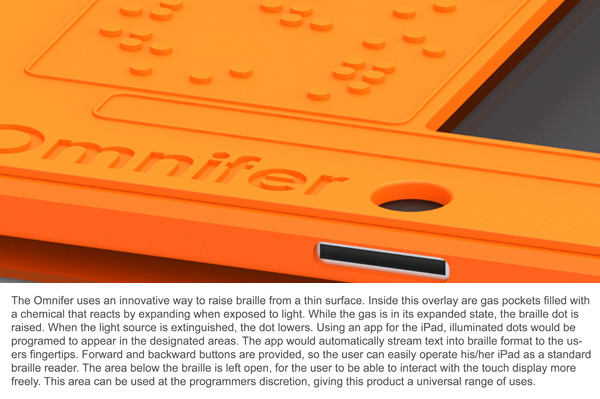
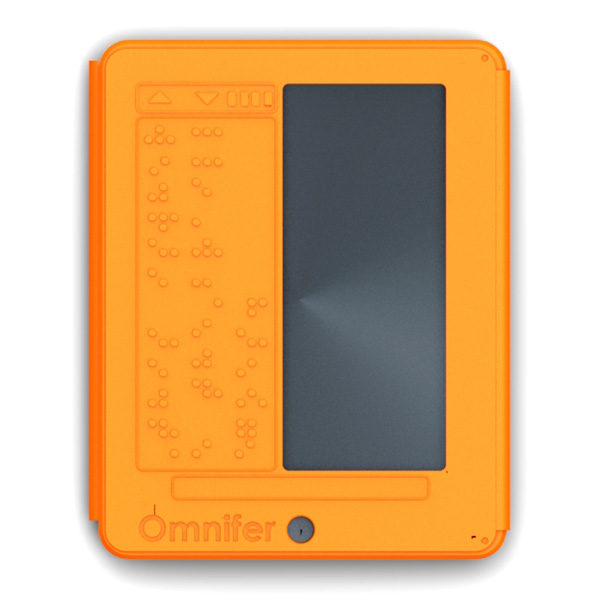
The iPad has many accessibility features built into the software. iOS includes VoiceOver, white on black and zoom. To learn more about iOS accessibility click here, here and here. A new concept case has a built in refreshable Braille display. The Braille display is very thin and does not add much wight. To learn more about thin refreshable Braille displays click here. The Braille display covers half of the screen for non-sighted users this is not a problem. The Braille iPad case is not for sale as of this post. To see more images of the Braille iPad case click read more below.


iOS Refreshable Braille Display Support


iOS has support for refreshable Braille displays. A Braille display allows a blind user to access the device. Refreshable Braille displays are compatible with the iPhone, iPod Touch and iPad. The Braille displays connect to your iOS device via Bluetooth. The pairing process is simple and quick. When the Braille display is connected to the device the Braille display can control the VoiceOver cursor on the display. The VoiceOver cursor can be used to select and read items on the screen.. Braille display compatibility allows blind users to access the information of their iOS device. For a list of compatible Bluetooth Braille displays click here. Watch the above video to learn more.

Tools to Make Typing on iPad Easier

Typing on the iPad's touch screen can be difficult and slow compared to a physical keyboard. While typing on the iPad you must look at the screen because you can not feel the keys. For people that can not see the screen typing on the iPad is slow. There are a couple of tools to solve this problem. The first solution is the iPad keyboard dock. The keyboard dock plugs into the iPad's dock connector and works with the iPad and iPad 2. The keyboard is similar to desktop and laptop key boards but has function keys specialized for the iPad. The keyboard dock costs $69 from Apple. Another option is a Bluetooth keyboard which connects to the iPad wirelessly. There are many Bluetooth keyboards on the market. Bluetooth keyboards can improve your typing experience on the iPad. Yet another solution is Keyguard which is a clear piece of plastic with holes cut  where the virtual keys are. Keyguard fits on the iPad so it does not slide off. Keyguard allows you to feel the location of the virtual keys. Keyguard comes it portrait and landscape views. Each orientation of Keyguard costs $19.95 from Lasered Pics. With these tools you will be able to type faster and more accurately on the iPad. 

iOS 5 to add new accessibility features (update)


Apple unveiled iOS 5 on Monday for their iPhone, iPad and iPod Touch devices. The new software adds many new accessibility features such as LED flash indicator for incoming notifications. This feature could be very useful for people with low vision that would be unable to see the screen but are able to see the flashing LED.

Another new feature of iOS 5 is speak-it. Speak-it allows a user to highlight text and then select speak-it and the highlighted text will be read allowed. iOS 5 adds many new features you can learn more and www.apple.com. iOS 5 will be released this fall.

(Update): Another accessibility found in a beta build of iOS 5 is the ability to draw custom gestures. These custom gestures will work with external braille displays over bluetooth. The feature could enable a user to draw a gestures to, for example, to control the braille display. Found on 9to5mac.com

The iPad Recliner from LapWorks


As much as I enjoy my iPad it does get a little heavy when you are holding it too long. Inevitably you will need to prop it up and what better way to do that, than with the iPad Recliner from LapWorks. The iPad Recliner is in a silver and black design to compliment your iPad. I have used other LapWorks products over the years and have come to like their functionality, design and construction. This is the case for the iPad Recliner, which lets you place your iPad on an incline in any number of positions and angles very quickly. The iPad Recliner can hold your iPad in the Portrait or Landscape mode and has a cushioned rest area to insure that your iPad does not move on the iPad Recliner. I found the iPad Recliner very easy to adjust, with just one screw - it is easy to change the angle of the incline when viewing your iPad.

While I have gotten used to using the virtual on-screen keyboard, when I know I will be doing a lot of typing I will take out my iPad Recliner and place my iPad in the landscape mode and use my Bluetooth keyboard to type. This provides meet with the perfect working setup that lets me comfortably view my iPad as I am typing on the keyboard. The iPad Recliner also makes for a great ebook reader when you want to have your hands free of holding the device. In any case, whether you are surfing the web, typing or reading an ebook the iPad Recliner is a perfect companion for your iPad. The iPad Recliner is the perfect companion for your iPad and I for one keep it on my desk to access when using my iPad. So check out the iPad Recliner!

Totally Tubular with iPevo Bluetooth Speakers

The number of new Bluetooth devices that roll out each and every week is astonishing. If you want to keep you can go to the official Bluetooth Site and check out all of the new products. Since doing the iPevo Point 2 View Webcam review, iPevo was kind enough to send me the iPevo Tubular Wireless Speakers to review, which takes advantage of Bluetooth, to stream the audio from your iPhone, IPod Touch, BlackeBerry or your PC to their speakers. I have to tell you when Bluetooth was first introduced I was not a real fan. I'm sure many of you spent countless hours as I did trying to pair up your Bluetooth devices. But Bluetooth has come a long way in the past couple of years with vast improvements in speed and pairing your device.

With this in mind, I set off to take a look at the iPevo Tubular Wireless Speakers which when paired with your audio device lets you transmit audio to the speakers without the need for a physical connection. The iPevo Tubular Wireless Speakers has a unique design and lives up to its name-you see the two individual speakers when stored are in the shape of a tube. The iPevo Tubular Wireless Speakers design works well and makes it easy to store the hidden USB cable and Mini RCA jack to connect the two halves of the speakers together. The built-in rubber spools on each speaker makes it easy to store the cables.The iPevo Tubular Wireless Speakers ships with a built in rechargeable battery which should give you 6 - 8 hours of listening pleasure. When it is time to recharge the battery you simply plug in the USB cable into your computer and charge it up. Each of the iPevo Tubular Wireless Speakers output up to 3 watts of sound which should be enough to fill a small room with your music.
for about
As recommended I initially charged the iPevo Tubular Wireless Speakers for about 2 hours to charge the battery. The indicators on the iPevo Tubular Wireless Speakers will let you know when the speakers are fully charged.Once charged I took out my BlackBerry Curve and started the pairing process to the speakers. The steps to do the pairing were prominently printed in the speakers and withing 30 seconds I was up and running. Pairing the iPevo Tubular Wireless Speakers with my BlackBerry was a cinch! Now the moment of truth! I opened my media player on my BlackBerry Curve and started to play a song and lo and behold the music was directed to the iPevo Tubular Wireless Speakers. The volume controls on the iPevo Tubular Wireless Speakers worked well and the sound quality was very good.

My next attempt to use the iPevo Tubular Wireless Speakers was with my MacBook. Once again I went through the pairing process very quickly and then went to my Sound Preferences and selected th iPevo speakers as my sound output. I fired up iTunes and had the music streamed to the iPevo Tubular Wireless Speakers. It truly was a very easy process and one that gives you the flexibility to play your music with just about any music device. Based on my experience I would say that you can successfully stream your audio from about 20 feet from the sound source. I was thinking that this would be a great device to use with the iPod Touch in the classroom especially for students that might be using Proloquo2go.com. Imagine a student sitting at their desk with the iPevo Wireless Speakers using their portable augmentative communication device and not having the burden to be physically connected to speakers. Let me know what you think.