Showing posts with label books. Show all posts

Khan Academy Releases iPad App


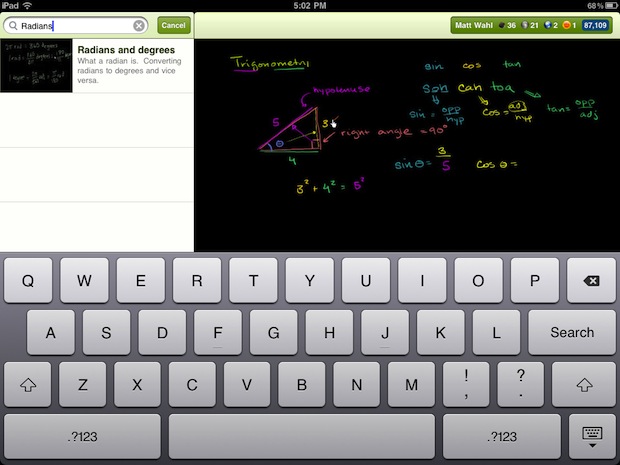
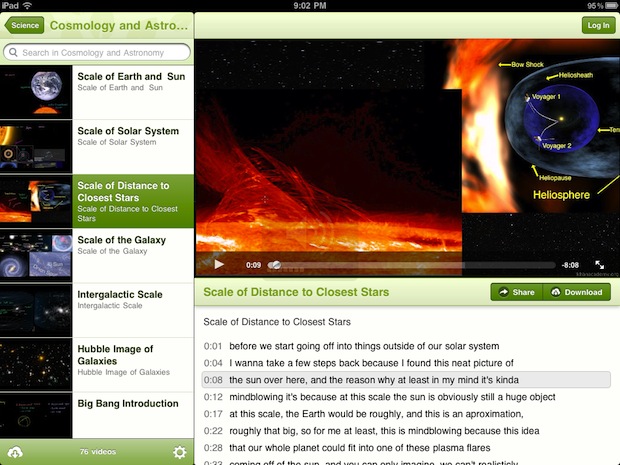
Khan Academy the website that makes free online learning videos has released a new app for the iPad. The newly released app allows you all of the video content. The Khan Academy is a great online learning resource and it is great to see it coming to the iPad. Click here to download the free app from the App Store. Khan Academy is a great resource for people who want to learn about a variety of subject or review for school assessments. In addition it is a great resource to compliment class notes. The video's include closed captions.

Five Questions to Ask Before You Buy a Dedicated eReader

I have been using eReaders for some time now and really enjoy the convenience and ease of use of these dedicated devices. In my travels to schools, I am beginning to see more and more schools pilot eReaders in the classroom, especially for students who struggle or who are unmotivated to read. Teachers see the value of students being able to change the size of the font and easy access to the dictionary feature. For many students who struggle in reading many are now more motivated to read on an eReader device as compared to a traditional book. Students can also peruse the Electronic Bookstore and of course with teacher permission download sample chapters from books to see if it will pique their curiosity to engage them in the reading process. But before you go out and purchase an eReader here are some questions you should think about:

1) Do I have access to WiFi in my school or building?

Many of the eReader's support WiFi as well as 3G which will enable you to download books directly to the device without the need to use a computer. If your school has a good WiFi infrastructure then you can save a considerable amount of money by buying the WiFi model of the eReader. For example the  Amazon Kindle Touch with WiFi is $99 dollars compared to the Amazon Touch WiFi/3G model which is $149  dollars. If your schools doesn't support WiFi then you should consider the Kindle Touch WiFi/3G model which would allow you to download books over the air using the 3G network. There is no extra data costs associated with using the Kindle Touch WiFi/3G model for downloading books to the devices.

2) How long can  I expect my dedicated eReader to stay charged?

Many of the dedicated eReaders that utilize E Ink technology can stay charged for long periods of time under normal use. The E Ink technology mirrors that of a traditional page and uses minimal battery life to render the black text on a white background. eReaders like the Kindle Touch and Nook that utilize E Ink technology can stay charged for up to 2 months- which is really incredible if you will be using in a school setting. eReaders that utilize E Ink technology assume that you will be reading the book with a lot of ambient light available.

3) Where can I purchase my books?

All of the major re-sellers of eReaders like Amazon, Bares & Noble, & Kobo provide the user with one stop shopping in their online book store. The online bookstore can be accessed from the devices and books can be quickly downloaded to the devices over WiFi or the 3G network. If you are purchasing books for a school you should investigate getting a corporate or school account with the companies so that you can purchase books with a school Purchase Order

4) Can I read other materials beside books on the dedicated eReader?

In addition to books many of the eReaders also support reading magazines, newspapers, blogs as well as your own personal documents in various formats ie. PDF & Word. When you purchase an Amazon Kindle you are provided with unique email address that you can send Word or PDF documents to, which can be delivered to your Kindle over the WiFi network. This feature is handy for students who want to read their documents on their eReaders

5) How important is having audio and Text to Speech capabilities on my eReader?

While eReaders are great for reading books some eReaders like the Kindle Keyboard and Kindle Touch also support playing audio books from Audible.com as well as reading text on the screen if the Text to Speech capabilities have been enabled by the book publisher. For students with reading disabilities or for those who struggle to read having the text to speech capabilities is a great feature.Likewise, being able to listen to a professionally narrated book from Audible can be very motivating for students who need to reengage with text.

I hope these questions and answers have provided you with some food for thought when you are planning to purchase eReaders. If you have any questions about eReaders, please feel free to email me. If you are interested I am available to run workshops on using eReaders in the classroom.

Learning Ally Recorded Books (Previously called RFB&D)


Recording for the Blind and Dyslexic changed its name to Learning Ally recently. Learning Ally still provides audio books for many titles. Learning Ally is also going to increase its advocating efforts for people who need print material in alternative formats. They will still provide audio books on CDs as well as downloadable. The books are digitally indexed which makes navigation very easy. The digitally indexed books allow you to skip pages and go to a specific chapter. Also you can speed up the speaking rate. The voice quality is great because the books are read by volunteers. Learning Ally also has an iOS app for iPhone, iPad and iPod Touch. The app allows you to download the audio books directly to your iPod Touch, iPad or iPhone. App Store Link The app has all of the navigation features as the CDs. The app costs $20 but is very great for Learning Ally members. To become a member you have to show documentation of a print disability. Membership is free for qualified individuals. In addition to individual memberships schools can become members in order to provide books to students with print disabilities.

Bookshare.org a great resource for accessible books


Bookshare.org is a site that provides free books to people with bona fide reading disabilities. Bookshare has thousands of books and more being added all the time. The Chafee amendment give Bookshare the right to distribute books to people with print disabilities. There is a wide variety of books, text books, magazines and newspapers to choose from. Bookshare also includes free text-to-speech software that is made for reading only Bookshare books. The software is both Mac and PC. If Bookshare does not have a book that you are looking for you can request it and they will add it to their library.

The text books that are available on Bookshare are a great resource students. Many of the text books are being updated with images for sighted members. Most books take only seconds to download when downloaded over a good Wi-Fi network.

The best part about Bookshare is the cost. They provide accessible books for free, the text-to-speech software is also included. They are able to provide this service because of a grant from the US Department of Education. In order to become a member you must have written proof of disability and be a US resident.

There will be many more tips, reviews and videos about this great service soon.

AnyBook Reader from Franklin - Teacher Tested

When I first learned about AnyBook Reader from Franklin I knew I had to get my hands on it and give it a test run. The idea behind AnyBook Reader is very straightforward. Pick a book any book, activate one of the provided stickers, record the page, and then let your child hear your voice reading the book. When my AnyBook Reader arrived from Franklin, I was excited to give it a whirl. I first installed the 2 AAA batteries and then followed the simple instructions that were provided and within seconds I was able to hear myself read the book. Following the sequence in the instructional  guide was made even easier as AnyBook Reader provides auditory cues to let you know when you are ready to record the page. Once you record the  page you simply touch the AnyBook Reader to the sticker and voila your page is read. AnyBook Reader comes with package of reusable stickers as well as stickers with pictures on them that make fun sounds and noises. It is easy to remove the plain stickers and re-record over them when you are ready to use them with another book. If you need to you can always reorder additional stickers. The AnyBook Reader is available in two different models- one that can store 60 hours of recording and another model which can store 15 hours of recordings. AnyBook Reader is priced at $59.99 for the higher capacity reader and $39.99 for the lover capacity reader. Children will find it easy to adjust the volume when using the AnyBook Reader and will enjoy the high quality audio when listening to the pages being read. AnyBook Reader makes it difficult for students to re-record a page by virtue of the sequence that is required to do so.

As much as I enjoyed using AnyBook Reader- the true test for AnyBook Reader had to take place in the classroom. I was so excited with the potential of AnyBook Reader that I decided to demonstrate it to one of my advanced assistive technology classes that I teach. All of my students immediately saw the value of AnyBook Reader  and could think of many ways to use it in the classroom. With this in mind, I decided to loan AnyBook Reader to one of my students who teaches preschool children so that she could field test it. I went over the directions on how to record the pages and set her off to give it a try. The preschool class had the opportunity to use AnyBook Reader for a two week period and when my student came to class to share how it went, she was so excited to share her observations. My student shared the she couldn't believe just how wonderful AnyBook Reader was in allowing her preschool children to sit and have the book read in her voice. She shared that the students were enthralled with AnyBook Reader as they sat there and listened attentively to the book being read. It was very exciting to hear this feedback and know that this is from an experienced teacher who actually field tested it in her classroom. I know that she will go out and purchase one for her classroom. The only comment that she made was that she wished there was a way to plug in a headset or ear buds. Which I would concur. For more information about AnyBook Reader click here.

If you are looking for a quick and easy way to make books accessible then you have to take a look at AnyBook Reader from Franklin. This is an affordable and fun way to engage students in the reading process. And along the way I'm sure you will come up with interesting ways to use this device to modify all kinds of materials :-).