Showing posts with label eReader. Show all posts

Amazon Improves Accessibility Features of Kindle Fire Tablets
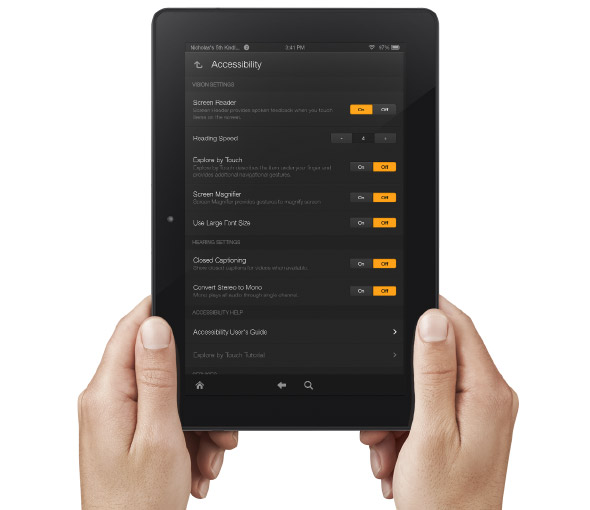

Amazon's newly announced Kindle Fire HD and Kindle Fire HDX include built in accessibility features. Historically, Amazon has been slow to make their Kindle products accessible. With the new accessible Kindle Fire and accessible Kindle app for iOS Amazon maybe turning a new page. That being said, Amazon still doesn't want to make their Kindle eReaders accessible and has requested an exemption from the FCC.

The new Android based Kindle Fire tablets includes accessibility features for the blind, low vision, hearing impaired, and mobility impairments. For the blind and visually impaired the Kindle Fire includes a screen reader that can describe what is taking place on screen. There is also Explore by Touch which allows users to use gestures to navigate items one-by-one. For low vision users the new Kindle Fire tablets include a screen magnifier which is activated by a triple tap on the screen. There are also large font size and high contrast options to benefit low vision users. For users with mobility challenges the Kindle Fire can be controlled with a Bluetooth keyboard. For dyslexic users the Kindle Fire includes Immersion Reading which synchronizes the text and audio version of a book. With Immersion Reading the text is highlighted as a professional reader speaks. It is important to note that to use Immersion Reading you must own both the Audible audio version and the Kindle ebook version which can be costly. While it is very exciting to see Amazon improving their accessibility features other tablets such as the iPad include more robust accessibility features.

The Kindle Fires also include a "Mayday" button that allows you to connect with technical support at anytime. The support person can then help walk you through using different functions of your tablet. This "Mayday" button could be useful especially for new tablet users.

The Kindle Fire is available in 7 and 8.9 inch form factors both sizes are available in HD or more powerful HDX variety. The cost ranges from $139 to $229 depending on the size and features. Click here to purchase from Amazon. Click read more below to view a video about Immersion Reading.


Five Questions to Ask Before You Buy a Dedicated eReader

I have been using eReaders for some time now and really enjoy the convenience and ease of use of these dedicated devices. In my travels to schools, I am beginning to see more and more schools pilot eReaders in the classroom, especially for students who struggle or who are unmotivated to read. Teachers see the value of students being able to change the size of the font and easy access to the dictionary feature. For many students who struggle in reading many are now more motivated to read on an eReader device as compared to a traditional book. Students can also peruse the Electronic Bookstore and of course with teacher permission download sample chapters from books to see if it will pique their curiosity to engage them in the reading process. But before you go out and purchase an eReader here are some questions you should think about:

1) Do I have access to WiFi in my school or building?

Many of the eReader's support WiFi as well as 3G which will enable you to download books directly to the device without the need to use a computer. If your school has a good WiFi infrastructure then you can save a considerable amount of money by buying the WiFi model of the eReader. For example the  Amazon Kindle Touch with WiFi is $99 dollars compared to the Amazon Touch WiFi/3G model which is $149  dollars. If your schools doesn't support WiFi then you should consider the Kindle Touch WiFi/3G model which would allow you to download books over the air using the 3G network. There is no extra data costs associated with using the Kindle Touch WiFi/3G model for downloading books to the devices.

2) How long can  I expect my dedicated eReader to stay charged?

Many of the dedicated eReaders that utilize E Ink technology can stay charged for long periods of time under normal use. The E Ink technology mirrors that of a traditional page and uses minimal battery life to render the black text on a white background. eReaders like the Kindle Touch and Nook that utilize E Ink technology can stay charged for up to 2 months- which is really incredible if you will be using in a school setting. eReaders that utilize E Ink technology assume that you will be reading the book with a lot of ambient light available.

3) Where can I purchase my books?

All of the major re-sellers of eReaders like Amazon, Bares & Noble, & Kobo provide the user with one stop shopping in their online book store. The online bookstore can be accessed from the devices and books can be quickly downloaded to the devices over WiFi or the 3G network. If you are purchasing books for a school you should investigate getting a corporate or school account with the companies so that you can purchase books with a school Purchase Order

4) Can I read other materials beside books on the dedicated eReader?

In addition to books many of the eReaders also support reading magazines, newspapers, blogs as well as your own personal documents in various formats ie. PDF & Word. When you purchase an Amazon Kindle you are provided with unique email address that you can send Word or PDF documents to, which can be delivered to your Kindle over the WiFi network. This feature is handy for students who want to read their documents on their eReaders

5) How important is having audio and Text to Speech capabilities on my eReader?

While eReaders are great for reading books some eReaders like the Kindle Keyboard and Kindle Touch also support playing audio books from Audible.com as well as reading text on the screen if the Text to Speech capabilities have been enabled by the book publisher. For students with reading disabilities or for those who struggle to read having the text to speech capabilities is a great feature.Likewise, being able to listen to a professionally narrated book from Audible can be very motivating for students who need to reengage with text.

I hope these questions and answers have provided you with some food for thought when you are planning to purchase eReaders. If you have any questions about eReaders, please feel free to email me. If you are interested I am available to run workshops on using eReaders in the classroom.


The Blio App is Here!

After months of anticipation the Blio app is out for iPad, iPhone and iPod Touch. The app is free from the iTunes App Store. Blio is an eReader that can read PDF, ePub and XML books. To add a book either select a file and press open with Blio or transfer the file to Blio via iTunes. Once the books is in the Blio bookshelf there are many reading options including text-to-speech. Unfortunately the text-to-speech voice is not included and costs $10 as an app purchase. Blio can also sync audio books with the text and highlight as each word is being read.

Blio also includes an elegant note taking system that is similar to iBooks. To add a note select a section of text and then press note then a note will appear allowing you to type your note. Blio also allows you to search the text of a book.

One of Blio strongest features is visual customization options. From within the visual settings menu you can change the view, text size and more. On the iPhone and iPod Touch there is another view called “fast.” Blio claims this view can increase reading speed and eliminate eye strain. “Fast” view shows one word at a time in large print in the center of the screen and then changes the word automatically as you read. In “fast” view you hold your finger on the right edge of the screen then side your finger down to decrease word speed and up to increase word speed.

Another handy feature is Blio’s one touch look up feature which allow you to get a definition of a word or look up a word or phrase using Wikipedia or Encyclopedia Britannica. Blio is a worth a try because of its text-to-speech capabilities and visual customization options. Keep in mind that Blio is free but the text-to-speech voices cost $10 each.

Daisy to ePub


Don Johnston, maker of Read:OutLoud and other software, has made Daisy to ePub converter software. The Daisy to ePub software works with Macs and PCs. The software converts accessible books such as NIMAS, DASIY and Bookshare to ePub format which can be read on popular eReaders. The software is very simple and converts books at the touch of a button. The Kindle is not compatible with ePub created with Daisy to ePub. It even coverts images within accessible books to ePub images. Daisy to ePub  works with iOS devices, Nooks and Sony Reader. If you are interested in reading your Daisy, NIMAS or Bookshare books with your eReader; Daisy to ePub is a great tool. Once you have your book on your eReader you can use its built in accessibility features to read the book aloud. (Such as VoiceOver on iOS devices) Daisy to ePub costs $99 for use on one computer.

Is There a Kindle in Your Future?

Amazon today released Kindle, a new book eReader gadget that allows you to download books, magazines and blogs. It uses the EVDO network to keep you connected to the Amazon website which means you do not need to be in the range of a Wifi connection to download books or to access the Amazon Store. There is no fee for being connected to the EVDO network for users. The Amazon Kindle will retail for $399 dollars and New York Times best sellers will cost you $9.95 to download. The question I have is, do we need another gadget to read books? While the demonstration looked pretty cool do we really need another electronic device to handle our books? Lets see I carry a cell phone, iPod, Palm and now a Kindle! While there are certainly advantages to digital books and magazines, I for one still enjoy holding a magazine or book when reading. I know that when I have to read long passages or documents on the web I still prefer to print them and read them at my leisure. For those with reading disabilities it would be great to have text to speech built into the Amazon Kindle-but this is not feature that is built in at this time. I would be interested in your comments and views on the Kindle.