Showing posts with label features. Show all posts

Braille iPad Case


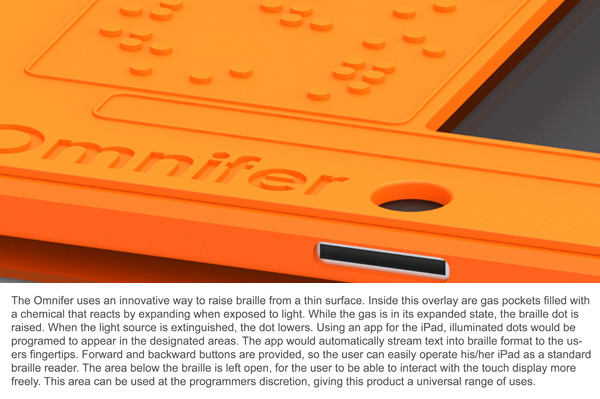
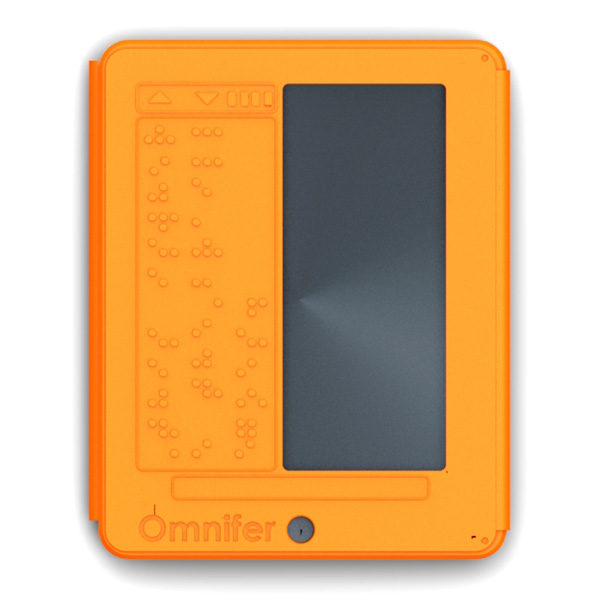
The iPad has many accessibility features built into the software. iOS includes VoiceOver, white on black and zoom. To learn more about iOS accessibility click here, here and here. A new concept case has a built in refreshable Braille display. The Braille display is very thin and does not add much wight. To learn more about thin refreshable Braille displays click here. The Braille display covers half of the screen for non-sighted users this is not a problem. The Braille iPad case is not for sale as of this post. To see more images of the Braille iPad case click read more below.


Free Kurzweil Webinars


The maker of Kurzweil is holding a set of free webinars this summer. The webinars will inform users about features Kurzweil version 12. Learning about features of Kurzweil can be very helpful to users who don't know about all of the things Kurzweil can do. The webinars will take place between June 21st and August 30th. To sign up for the webinars look after the break for dates and times.

Kurzweil 3000 V12 Overview

Tuesday, June 21, 2011, 2:00 p.m. EDT
Sign up now.

Tuesday, June 28, 2011, 2:00 p.m. EDT
Sign up now.

Tuesday, July 5, 2011, 2:00 p.m. EDT
Sign up now.

Tuesday, July 12, 2011, 2:00 p.m. EDT
Sign up now.

Tuesday, July 19, 2011, 2:00 p.m. EDT
Sign up now.

Tuesday, July 26, 2011, 2:00 p.m. EDT
Sign up now.

Tuesday, August 2, 2011, 2:00 p.m. EDT
Sign up now.

Tuesday, August 9, 2011, 2:00 p.m. EDT
Sign up now.

Tuesday, August 16, 2011, 2:00 p.m. EDT
Sign up now.

Tuesday, August 23, 2011, 2:00 p.m. EDT
Sign up now.

Tuesday, August 30, 2011, 2:00 p.m. EDT
Sign up now.

Intel Reader: First Impressions

I have had the Intel Reader for about a week now and it is helping me a lot. I used it to study and read the newspaper. The Intel Reader is very easy to use and has  very large buttons. The software is very simple and there is the option to read the Intel's menu items aloud for people who can't see or read the items. In order to read a document with the Intel Reader you must take a picture of the document and then the Intel Reader recognizes the text in the document. The Intel Reader does take longer than I expected to recognize the document. For a one page document the scan time was about one minute. Also, the read makes a few more recognition mistakes than Kurzweil, but its accuracy is still very good. Unfortunately, the Intel Reader doesn't have many additional features. Some features that I wish were included are a built in dictionary and the option to highlight text. The Reader comes with two computerized voices that are above average quality. The Intel Reader is still a great tool for reading documents quickly. Also, for completing worksheets and assessments Kurzweil is a better tool because of Kurzweil's fill in the blank features and other annotation options. The Intel Reader helped me a lot while reviewing for tests. If I need to read section of handouts in my notebook the Intel Reader worked great. The Reader is a great tool for quickly accessing text but I wish Intel had included more features. I would recommend the Intel Reader for people who struggle to read or can not see the text on the page. Keep in mind that the Intel Reader does not allow for any annotation.