Showing posts with label sensors. Show all posts

LabQuest 2 from Vernier- Connected Science System

It has been a couple of years since I last reviewed the Labquest from Vernier, so when I was able to get my hands on the LabQuest 2, I was really excited to find out about all the new enhancements in this new handheld connected science system. The LabQuest 2 is about the size of large cell phone with a high contrast screen that is powered by a high capacity rechargeable Lithium battery. The Labquest 2 has a great design and feels very solid in your hands as you use the device. The high resolution touch screen is great for viewing when you are using it outside in the field. Vernier did not skimp on the processing power in this device and you will find it very responsive when you are collecting or analyzing data on the device. The LabQuest 2 supports all of the Vernier sensors making it easy for schools who have invested in their devices and probes. The LabQuest 2 now includes both WiFi and Bluetooth which opens up all kinds of possibilities which I will discuss later in the post. Additionally, the LabQuest 2 has built-in accelerometers as well as GPS which can be utilized with other sensors for recording such data. I should mention that the LabQuest 2 is compatible with both Mac and Windows computers.


LabQuest 2 Screenshot
But no matter how good the hardware is-how does the LabQuest 2 hold up when in use? This is where this device really shines! Teachers will find that the LabQuest 2 is a dream to use-just plug in the sensor which will be automatically detected by the LabQuest 2 and press the Collect button to get started. Instantly students will be able to see their data being displayed on the screen. Once the data is collected students can spend their time using the analytic tools built in or transfer the data to a computer. Teachers can also have students email the data, graph, or screenshot directly from the LabQuest 2, that was captured, which makes it easy to include in a lab report. The LabQuest 2 supports analysis with linear and curve fits and allows students to record their notes on the device, with the on-screen keyboard. Teachers will enjoy the fact- knowing that the LabQuest 2 comes with over 100 experiments that are pre-loaded on the device which students can access. If teachers would like to customize the labs, Vernier has a handy Lab Creator Tool that is available to teachers that allows you to tweak the lab to your liking. 


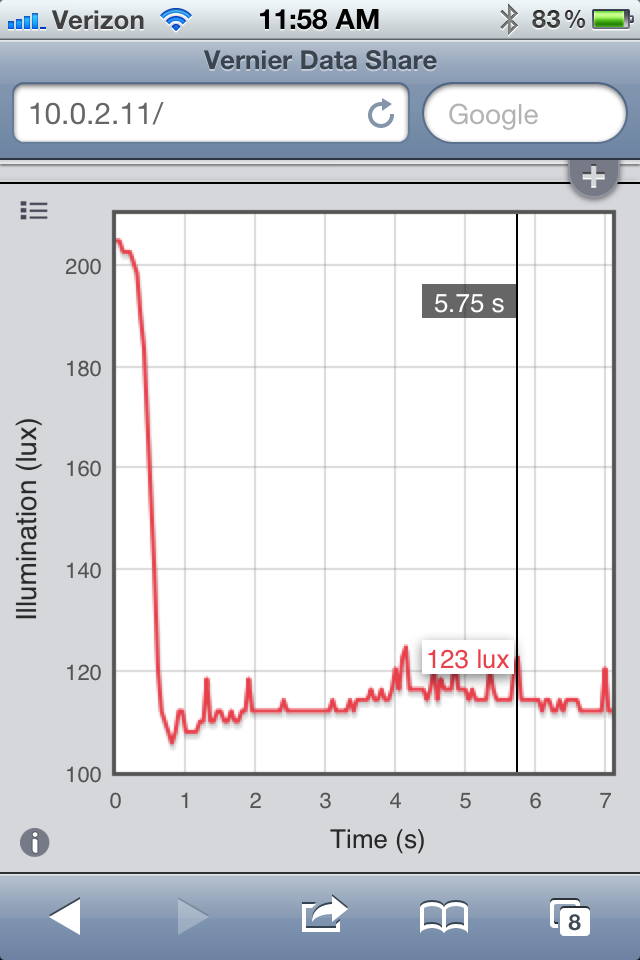
Vernier Data Share on iPhone 4S
In this age of bring your own device (BYOD) Vernier has taken this model to heart and created the "connected science system," allowing anyone with a browser to view and interact with the collected data. This enables students with iPhones, Android Phones, iPod Touches, and iPads, to launch their browser and view the data live as it is being collected. All the students need to to do is go to their Settings and make sure that their device and the LabQuest 2 is on the same wireless network. Now simply launch the browser and enter in the IP address or name of Network and voila you are ready to view the data being collected in real time. I have tested various browsers, using my iPhone, iPad, and Kindle Fire with the LabQuest 2 and in each case the data was instantaneously available for me to preview in real time. For a richer set of tools, teachers can purchase the Graphical Analysis for iPad app from the App Store.

With the LabQuest 2, Vernier has transformed the way teachers need to think about teaching science in the classroom and provided them with an easy and powerful solution for capturing data in real time. Utilizing their "connected science system" with the LabQuest 2 it is now possible to extend their set of tools to students, so that they can collaborate in real time-by simply launching a browser. For teachers that want to create more interactive science lessons and give students the opportunity to collect data the LabQuest 2 is certainly an outstanding tool you should include in your classroom. Giving students the opportunity to both visualize and analyze data is at the heart of science and what better way to make it hands-on than with the LabQuest 2. For ore information about the LabQuest 2 you can click here.

If you are considering using the LabQuest 2 in your classroom Vernier will be offering free 4 hour workshop sessions in the Fall. For more information about the workshops click here.

Go!Tweet! from Vernier Software & Technology

I just learned about this new Twitter application from Vernier Software & Technology called Go!Tweet which can provide real time data capturing that is sent and posted through your Twitter account. Imagine classrooms linked across the globe using this technology to capture real time scientific data using Twitter. It is really simple to get started using this new application. First you will need a Twitter account. Second, you can download the Go!Tweet application from Vernier which at this time is only available for the Macintosh. Thirdly, you will need to have one of the following digital sensors:
Once you have the Go!Tweet application installed simply plug in your sensor and start sending your data to your Twitter account. I used my Go!Temp USB sensor this morning to send the temperature in my kitchen to Twitter. Now imagine have a consortium of schools doing a project and using the Go!Tweet application to send live data that can be tracked over Twitter- pretty cool! Remember that you can use the # hashtag to track your online data collection projects. Just have everyone who is involved in your data collection project use the same hashtag ie. #DataProject101 which can then be searched on Twitter. You can go into the Preferences in Go!Tweet and enter the hashtag that will automatically be posted with the data. Works like a charm! Now just wondering when Go!Tweet will be available for Windows?

Using the Vernier GPS Sensor with the LabQuest

I first want to thank Vernier Software & Technology for sending me their latest GPS Sensor to review that can be used with LoggerPro 3.7 and the LabQuest. I have always had a keen interest in both science and technology and would have loved to have access to a LabQuest in my science classes when I was in school. In this day in age of technology, the LabQuest foots the bill for an easy to use handheld data collection tool. The LabQuest continues to grow as an educational tool as more and more sensors get added to the product line. I was very glad to hear that Vernier was going to release a GPS Sensor this spring that could be used with the LabQuest and when it arrived at my doors steps, I couldn't wait to give it a try. Vernier shipped me the GPS Sensor along with LoggerPro 3.7 software which incorprates some new features that can take advantage of the GPS sensor. My first reaction was "wow," when I first saw the GPS Sensor, no bigger than a USB thumbdrive that I carry with me. My first order of business was to update the system software on my LabQuest which went off without a hitch. Once the LabQuest was updated, I plugged in the GPS Sensor and watched as my LabQuest honed in on the satellities. Within seconds my LabQuest was displaying a readout of the latitude and longitude.

I decided to give the GPS Sensor a try and walked around the periphery of my home located in the Northwest part of New Jersey. I plugged the GPS Sensor into the LabQuest and pressed the Start collection button. As I walked around the property line, I watched as the LabQuest updated my position on the screen. After walking around the property line, I came back into my office and launched LoggerPro 3.7 and plugged the LabQuest into my computer. Within seconds, LoggerPro 3.7 prompted me to download the data that I had just collected. You will find LoggerPro and LabQuest easy to use and the helpful prompts will ensure that you are able to offload your data correctly to your computer. Once the data had been downloaded to LoggerPro you can take a look at your Speed, Altitude, Time and Latitude (Direction) from within the software.

One of the really exciting features of bringing your GPS data into LoggerPro 3.7 is the ability to map it. Right now there a two options for mapping your data: exporting the data in a GIS format or exporting it to Google Maps. In my instance, since I was connected to the web, I decided to export the data directly to Google Maps which was really exciting. Within seconds my route around the periphery of my home was plotted within Google Maps, which you can see in the screenshot.


The GPS Sesnor from Vernier worked really well and should give you some reason to think how you can integrate this location based technology in your science and math programs. It should be noted that you can connect other sensors to your LabQuest while the GPS Sensor is connected which makes this an ideal tool for doing field work where there is a need to have your position automatically recorded. Think about the type of environmental projects that would benefit from using the LabQuest and the GPS Sensor in the field. Certainly water quality studies are a prime candidate for using this type of technology. If you can think of some other ideas please leave a comment. The GPS Sensor is an excellent addition to the full line of Vernier sensors that can be used with the LabQuest and begs teachers to think about innovative ways to use location based data collection tools in their classrooms'.

Vernier's Labquest Handheld Data Analysis Tool

I have written great deal about the use of probeware in the classroom and how it can change the way science is taught in schools. At NECC 2007, Vernier Software & Technology was showing their latest product called LabQuest. LabQuest is a handheld data capture tool with real time graphing and analysis that is done with the device's high resolution touch screen. The LabQuest looks to be the perfect device for both in the classroom and for field use. Students can plug in any on of the 50 sensors to collect data. Read the Press Release below for more information
-------------

Vernier’s New ‘LabQuest’ Handheld is the Most Versatile
Data Analysis Tool in Science Education Today

Device serves as one-stop source for data collection and analysis

Beaverton, OR – June 25, 2007 – A new, intuitive handheld device places data analysis at the fingertips of science students and educators, whether they are in the lab or in the field. With LabQuest from Vernier Software & Technology, students can plug in Vernier sensors to acquire real-time graphing and analysis via the device’s color screen for subjects such as physics, chemistry, biology and Earth science.

Vernier LabQuest allows students to collect data from more than 50 sensors and view and analyze the data in a meter, data table or graph. The device also enables students to draw a prediction before taking data, display a tangent line on their graphs, as well as use linear and curve fits, autoscales, integral functions and statistics in their analysis.

The handheld contains six sensor ports, a built-in temperature sensor for measuring ambient temperatures, and a built-in microphone for recording voice.. Other built-in applications include a stopwatch, a periodic table, an on-screen keyboard and a scientific calculator. The 40 MB storage capacity can be expanded through an SD/MMC card or USB drive.

Users can operate the LabQuest using the built-in LabQuest Graphing and Analysis Application or connect it to either a PC or Mac in order to export collected data to Vernier’s Logger Pro software. The handheld can also be connected to a printer, headphones, speakers or other devices.
(more)
LabQuest Brings Versatile Data Analysis to Science Studies
Page 2

The 320 x 240 color graphic display with LED backlighting provides sharp, clear color images. LabQuest is designed for ease of use, allowing for navigation through either its buttons or by pressing an accompanying stylus to the touch screen and on-screen keyboard. In addition, the rubber overmolding and rugged design provide protection against bumps, falls and water. A lithium-ion rechargeable battery pack ensures that users can use the device for an entire school day before having to recharge.

“Our new LabQuest is a breakthrough in data-collection technology. For the first time, students have complete capabilities while out in the field,” said David Vernier, co-founder of Vernier and former physics teacher. “The LabQuest allows for professional-grade inquiry while out in the field and fosters scientific analysis for all students. And we have backed it with a comprehensive curriculum.” Vernier has embedded more than 50 science labs in LabQuest, and 10 of the company’s popular lab books have been updated with instructions for using the handheld in experiments.

Pricing and Availability
LabQuest is scheduled to ship in September 2007 for a price of $329. Purchases of eight or more devices will earn a discount price of $299 each. Vernier will demonstrate the device to the media during NECC.

Educators can visit www.vernier.com/labquest to view an online product tour and up-to-date details, sign up for a free 30-day preview, and see when free Vernier workshops offering LabQuest demonstrations and hands-on trials will be in their area.

About Vernier Software & Technology
Vernier Software & Technology has been an innovator of data-collection technology for 25 years. Creating easy-to-use and affordable science interfaces, sensors, and software, their products can be found in education from elementary school to college. Vernier helps teachers enhance their science curriculum, increase learning, and build students’ critical thinking skills. Vernier’s technologies are in use worldwide in more than 120 countries. For more information visit www.vernier.com.
# # #