Showing posts with label tips and tricks. Show all posts

ChromeVis: Free Tool for Chrome Users With Low Vision
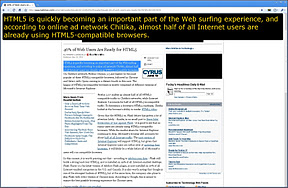

ChromeVis is a simple Chrome extension for users with low vision. ChromeVis is simple to use and has many customization options. To use ChromeVis highlight the text you want magnified and then click on the ChromeVis icon in the top right of your Chrome window. To customize the appearance of ChromeVis right click on its icon and select options. To download ChromeVis for free click here.

iOS 5 Tips: Use Assistive Touch to Replace a Broken Home Button, Lock Button or Volume Button


Assistive Touch is a new feature in iOS 5 that allows people with physical disabilities to better use their iOS device. To learn more about AssistiveTouch click here. To enable Assistive Touch go to Settings>General> Accessibility>Assistive Touch and then turn on Assistive Touch. A small round white button will then appear on your screen. When you touch the white button a list of commands will appear including a software home button, lock button and volume up and down button. You can now use these software buttons to replace your broken home button or any other broken buttons. You can drag the white button to different places on the screen for your convenience. Watch the video below to learn more.


iOS 5 Tip: Look Up Any Word


A new feature in iOS 5 allows you to get a definition of any word from any app. To get a definition of a word simply select the word by holding down on it for a couple of seconds and then tap define. A dictionary will appear with that word defined. When you are done tap done to return to your app.