Visual Thesaurus 3


In my effort to find tools that are both fun and engaging to use, one that stands out is Visual Thesaurus. Visual Thesaurus is like no other thesaurus you have ever used. Just type a word into the text box and watch as an animated web is drawn with your word in the center with related words connected to it. Different colored links depict synonyms or antonyms and students can click on any word to see another whole set of related words. Just hover your mouse over the word and the definition appears. It is easy to drag the definition to Microsoft Word if you need to capture it for a written assignment. Students can try out Visual Thesaurus at ThinkMap. Give it a try on the web and let me know what you think!

Mindjet MindManager 6


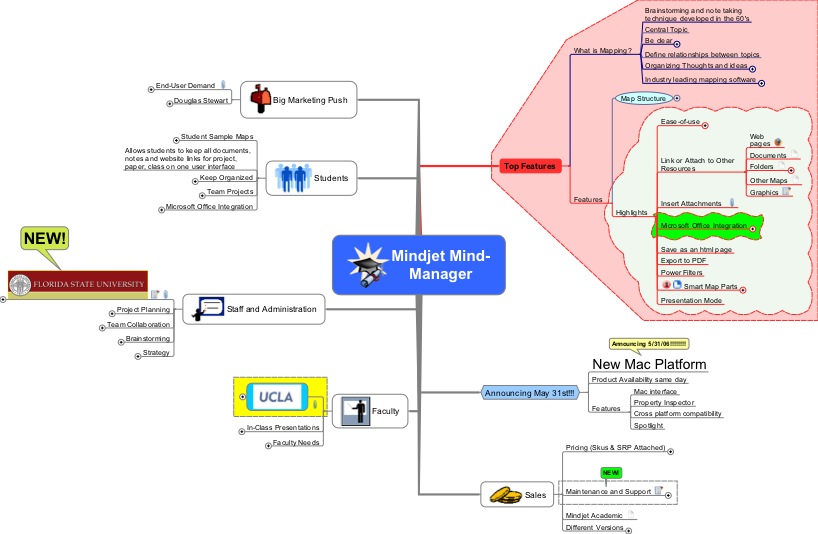
I have been using Mindjet MindManager 6 for the last 6 months and find it to be an indespensible tool for teaching and preparing my classes. Having information in a visual mind map is a great way to get an overview of what is being presented. Mindjet MindManager 6 seamlessley integrates with Microsoft Office and is wonderful tool as a repository of links, documents, spreadsheets, RSS feeds, Outlook task, and Outlook appointments. With so much going on it is nice to know that I can open one document and get a snapshot of all the material in one location. Mindjet MindManager 6 is a very powerful tool that you will find easy to use and is great as a presentation tool as well. If you are interested in taking mind maps to the next level then look no further than Mindjet MindManager 6.

Remind Me

With so much going on all the time it is nice to know that Rminder is there in a pinch to remind me of upcoming appointments and meetings. Rminder is a free Internet service that allows you to schedule Rminder to call your phone at a designated time to tell you about an upcoming appointment or an event. It is easy to use and set up and works as stated on the web site. Give it a try! Think of all your students who could use a little reminder every now and then.

Web 2.0

As I scour the Internet for new applications I am amazed by all of the new Web 2.0 developments and can only imagine what the future holds. A lot of venture capital is now being invested in some of these new companies looking for the next Google. In my travels I came across this wonderfully crafted site that has aggregated new and upcoming Web 2.0 companies. Take a look at www.go2web20.net to get a sense of what is happening on the Web 2.0 front.

If you haven't already used it Google has integrated Writely and their Spreadsheet application on the web. This is just a glimpse of what is possible-just imagine access to a word processor and spreadsheet wherever you are. Just add a text to speech and their you have it a talking word processor over the web. Better yet, you can collaborate on your documents by giving others permission to share your documents. I

In the drawing realm you could access Gliffy and have at your disposal an easy to use drawing and design application . It is easy to create flow charts and simple diagrams using the application on the web.

These are just a couple of applications that give you a glimpse of what is to happen as the Internet gets faster. Just for fun go to Springdoo and send someone a audio or video email. The future is exciting as more and more companies begin to weave their applications on the web.

Other Blogs of Interest

One of the highlights of going to conferences like Closing the Gap is having a chance to sit down with your colleagues and find out how they are using various technologies to meet the needs of students with disabilities. At closing the Gap I had a chance to chat with Lucy, Brian, Nora, Kirk, and David and was just amazed at how they are using technology.

Some of my colleagues have some wonderful blogs which should be of interest to use.

Lucy Gray is an Apple Distinguished Educator from Chicago and has some wonderful ideas about using technology with students. Lucy's blog can be found at: http://elemenous.typepad.com/weblog/2006/10/friday_5_found_.html

Brian W. Wojcik, Nora Bardi, Kirk Behnke, and Dave Hohulin did a presentation about

Blogs, Wiki's, Webcasts, Etc. - New Tools for Students with Disabilities at

Closing the Gap which you should find interesting. Here is their link:
http://closingthegap.wikispaces.com/

A Good Experience

Just yesterday I had the opportunity to try out video conferencing over Skype with my graduate class in assistive technology. Deb Barrows from Crick Software was gracious enough to come on-line using the video feature found in Skype. For the most part it worked out great-we are having some bandwidth issues on the campus which should be remedied shortly but every once in awhile Deb's voice would break up and go in and out. This was partially fixed by turning off the video stream. Everyone in the class was able to see her as we spoke about Clicker 5 and the just announced Clicker Paint programs. After a short introduction, Deb set up a GotoMeeting session and we were able to share Deb's computer desktop. Deb walked us through creating a Clicker 5 ebook which went extremely well and then she introduced everyone to Clicker Paint. I think that everyone was generally very excited to use this technology and have someone come into the classroom using the Skype setup. Having access to these technologies can transform classrooms and I hope that my graduate students whom themselves are teachers will take the risks and give these technologies a try in their classrooms. Think about all the exciting ways you could use simple video-conferencing in your classrooms. I know that there are a lot of eager teachers who are looking to use these technologies and what a great way to do link classrooms across town or across the continent. Take a look at the iSighted web site for ways to hook up with other teachers who are using webs cams in their classrooms.

Mixing and Matching

Today I was working with a middle school student trying to put together a system of tools that could work for him at home. As much I would like to find tools that give students the most coverage for what they need, it often comes down to looking at several different pieces of software to do the trick. Working with the middle school student who has difficulty getting started with writing book reports and essays, it was apparent that looking at programs like Inspiration and Draft:Builder would be great starting points. I showed the student the programs and had him try it out so that I could get his feedback. After using the programs he thought that Draft:Builder could do the trick for him. We next took a look how Dragon Naturally Speaking could integrate with Draft:Builder and I had the student dictate into a Draft:Builder Note-which worked quite well. Between Draft:Builder and Dragon Naturally Speaking we had a real winning combination to support this students writing. I guess if there is a lesson to be learned sometime you need to think out of the box and mix and match your AT.

CTG 2006 Comments

I am exhausted just getting in from Newark Airport and having spent the week at Closing the Gap. Having a chance to walk the Exhibit Hall and spending lots of time talking to other assistive technology specialists is invigorating. If anything, everyone pushes themselves to the limit and tries to squeeze out every minute learning and talking about our experiences in the field. Having walked the Exhibit Hall, there was lots of new assistive technologies displayed but there were no really big announcements to speak of. Crick Software showed Clicker Paint which I am sure that you will enjoy using with your students, it integrates with Clicker 5 and is truly accessible by mouse, switch or any other access method. Clicker Paint can also be used as a stand alone paint application, It will be a great addition to Clicker 5 when it is released in January. John Crick has done some outstanding programming to make the Clicker Paint a truly accessible tool. Also look for a free upgrade to Clicker 5 in the next couple of weeks. TextHelp released Read & Write Gold on a USB Flash drive which now brings true portability to their full featured assistive technology suite. Likewise, Don Johnston was showing off their recently released Incite videos which is a great way for teachers to help provide students with the background information they need when accessing the curriculum. For teacher working with students with more severe disabilities, SoftTouch just announced the release of Test Me Score Me 2.0 which is a wonderful tool for teachers to have at their disposal for alternate assessment. The program is easy to set up and use and keeps a running record of the students performance. Teachers can use graphics, sound, text and select from many access methods. If you need to design alternate assessment for your students with moderatge to severe disabilites then Take a look at Test Me Score Me 2.0.

Closing the Gap Day 2

I'm sitting here checking my email and waiting for the festivities to start this evening. From 5pm - 8 pm the Exhibit Hall opens for a preview of the latest hardware and software. It is very exciting to be able to catch up with my colleagues in the field to find out what they are up to. I'll let you know what happens and keep you posted.