Intel Reader Vs. ZoomReader


The Intel Reader and ZoomReader can both help people read. Both OCR printed text and then read the text aloud. The ZoomReader has more features then the Intel Reader. In my test the ZoomReader app recognized and read the text faster then the Intel Reader. To download the ZoomReader app click here. Watch the video above for more information.

Long Division and Long Multiplication Apps Help Math Students (Giveaway)


The Long Division and Long Multiplication apps for iOS walk students through math concepts step by step. The apps help students master new concepts and improve on old skills.  Both apps are $1.99 in the iTunes App store. Long Division iTunes link. Long Multiplication iTunes link.  These apps are only two in a series of 18 math help apps. The other apps can be found here. If you or someone you know needs help learning a math concept these apps are a great resource.

Check back on this blog within the 24 hours for promo codes for free copies of Long Multiplication and Long Division. The reader who enters the codes into iTunes first will win a free copy. The are three promo codes for each app so if you miss the first one check back latter for another chance.

ZoomReader Review (Giveaway)


ZoomReader is a combination of a text-to-speech reader, OCR (optical character recognition) reader and zoom magnifier. The app is compatible with the iPhone 4. ZoomReader can help people with many disabilities and challenges including low vision, blindness and dyslexia. The app uses the iPhone 4's camera to magnify printed text up to four times its original size to allow people with low vision to better see the text. ZoomReader can also change the contrast when the iPhone is held over the text to make it easier to read. ZoomReader also includes a lighting fast OCR feature that converts printed text into electronic text that can be read aloud. If you are unfamiliar with OCR click here. Once the text is converted to a digital format it can be read aloud by an included text-to-speech voice.

One tip for improving the OCR quality is to turn on the camera flash. You can also add new text-to-speech voices for $2.99. The app has many customization options that allow you to change the appearance of the reading experience. Another killer feature is the voice activation powered by Nuance. To turn on speech activation touch the microphone in the top left. The voice activation feature allows you to take pictures and zoom in on text with the sound of your voice. For example you can say "take picture" to snap a picture of a document. To learn more about Nuance's accurate speech-to-text engine click here. The ZoomReader app is perfect for people with low vision, dyslexia or blindness. The app is $19.99 in the iTunes app store.

Two lucky winners can win this app for free by checking back on this site for giveaway information and promo codes. Watch my video review above for a demonstration. Click read more below to see screen shots and how to videos. Do not forget to check the Assistive Technology Blog in the next few days for giveaway details.


Vibrating Alarm Clocks Help the Hearing Impaired


Alarms are very important to wake people up. People with hearing impairments can not hear when the alarm goes off. Luckily there are vibrating alarm clocks to wake hearing up people with hearing impairments. There are many models of vibrating alarm clocks at a variety of prices. One option is the Shake-N-Wake vibrating alarm clock which is worn on the wrist. The clock and vibrator are all small enough to wear on your wrist. The Shake-N-Wake alarm clock is $19.99. There are many other options for people who need vibrating alarm clocks. To shop for more click here.    


Using Encryption in Microsoft Word


Some students may need tests and quizzes in an electronic format for various needs. Teachers may be hesitant to distribute tests and quizzes ahead of time because of academic integrity concerns. With Microsoft Word you can encrypt tests and quizzes and securely distribute them to students who need electronic documents. With an encryption document  the student is unable to open the document without knowing a code. The teacher could email a student an encrypted document for a test the next day. Then on the day of the test the teacher could simply give the student the code to unlock the test. This ensures students will not have access to tests and quizzes before hand, but also ensures that the test will be ready and available so the student who needs the electronic version gets it at the same time as all of the other students.  To learn more watch the video above. For more Microsoft Word tricks click here and here

Kurzweil Bubble Notes


Bubble notes is a great feature in Kurzweil 3000. Bubble notes allows teachers to easily assess students. Bubble notes also helps students easily complete tests and quizzes. To insert a bubble note go to tools, then notes, and then bubble notes. When a student reads up to a bubble note it will automatically open and be read aloud. Bubble notes can have multiple choice, true or false, matching and open ended questions Once a student completes the assessment the teacher can extract the student's answers to easily grade the student's answer. Bubble notes can make tests and quizzes easier for students and teachers. Watch the video above for more information. For more Kurzweil tips and tricks click here, here and here.

Kurzweil 3000 Online Tips


The above video is a short example of how to use online downloading in Kurzweil 3000 version 12. Online downloading allows users to download content from many sources directly into Kurzweil. Kurzweil allows users to download books Project Gutenberg, Bookshare and many more. To use online book downloading go to the online menu and then select search for books. Once you search for and download the book go to file and then open to start reading the book. This method of downloading books directly into Kurzweil allows you to quickly access books from many sources. To watch this video with YourTube click here. To learn more about YourTube click here.

Braille iPad Case


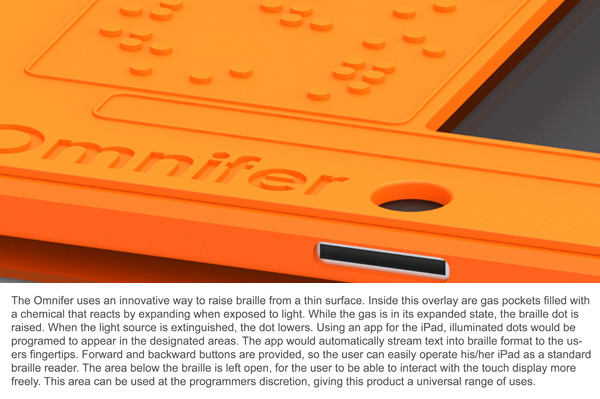
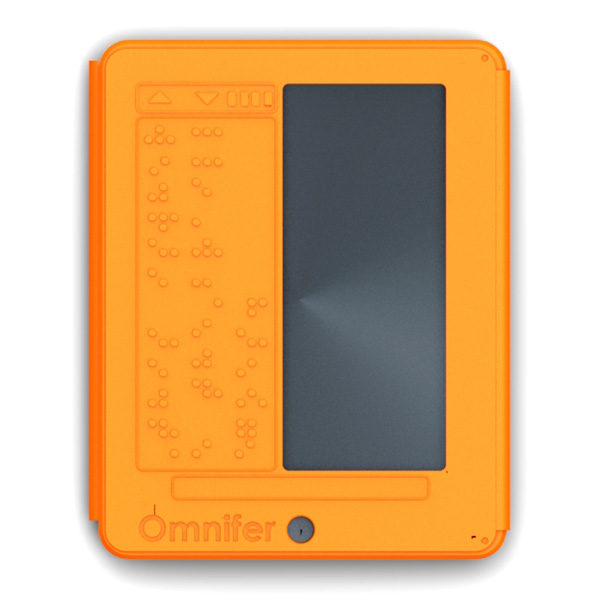
The iPad has many accessibility features built into the software. iOS includes VoiceOver, white on black and zoom. To learn more about iOS accessibility click here, here and here. A new concept case has a built in refreshable Braille display. The Braille display is very thin and does not add much wight. To learn more about thin refreshable Braille displays click here. The Braille display covers half of the screen for non-sighted users this is not a problem. The Braille iPad case is not for sale as of this post. To see more images of the Braille iPad case click read more below.


iOS 5 Reminders App Will Help Everyone

Apple next operating system upgrade for the iPhone, iPad and iPod Touch will include a new app called Reminders. iOS 5 is set to be released this fall. To learn more about the accessibility features in iOS 5 click here and here. The Reminders app will is a to-do list that notify you when you have something to do. Within the app you can make a to-do list and set it to remind you to complete the task at a particular date and time. The app can also remind you to do something when you leave or enter a location. For example you could set a reminder to alert you to pick up the eggs after work. The new reminder app in iOS 5 will help many people remember tasks through out the day. Apple explains the Reminders app on apple.com as,
"Next time you think to yourself, “Don’t forget to...,” just pull out your iPhone, iPad, or iPod touch and jot it down. Reminders lets you organize your life in to-do lists — complete with due dates and locations. Say you need to remember to pick up milk during your next grocery trip. Since Reminders can be location based, you’ll get an alert as soon as you pull into the supermarket parking lot. Reminders also works with iCal, Outlook, and iCloud, so changes you make update automatically on all your devices and calendars."
The Reminders app is not available on the app store and is only available for iOS 5. Click read more below to see more images and a video of the Reminders app.