Wikisummarizer Adds Keyword Cloud

If you have ever played around with Wordle then you know just how much fun it is to see the keywords from a website jump out at you- visually showing you the topics that have been covered. I was very glad to receive an email from Henry Lewkowicz from Context Discovery that a Keyword Cloud feature has been added to Wikisummarizer. I gave it a try and searched on the term "Assistive Technology" to see how the Keyword Cloud feature would work. Wikisummarizer generated the Keyword Cloud very quickly and when I was done I copied the embed code that was supplied and pasted it into my blog for all of you to see. Works like a charm as you can see- so go give it a try and let me know what you think!


NoteControl - Taking Charge of Your Resources

With information coming at us at a frantic pace it is no wonder that we can quickly become overwhelmed. This is especially true for students who have a need to curate their notes and sources when writing research articles. Life was a lot easier for me when I was in school, there were simply books and journals, that I used to cite my works. Today students are faced with the myriad of Internet sources, books, journals, podcasts, and multimedia to keep account of when doing research. In this light, Matchware, recently released a new product NoteControl aimed at students to help them collect, collate, and sort notes when doing a written research paper. The coup de grace is the ability of NoteControl to output a perfectly formatted bibliography in many accepted and recognized formats (ie APA, MLA, Harvard to name a few.).

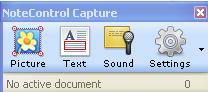
The premise of the program is quite simple-you create a notebook and then use the space to capture all of your notes which can include: Text, Picture, Sound, and Web notes. NoteControl allows the user to create a Folder structure to organize your notes and it is easy to move Notes that you capture from one folder to the next. For example, if you want to create a citation for text from a web site, you can simply go to the web site and highlight the text you want to use and then Click on the Text Note icon. This will bring up a note card with the text automatically included- you can change the name of the note card and once you click the Accept button your noted will be stored along with the source.You can use the same technique to capture graphics from websites or store needed  files (Word, PDF's) for your research project. If your computer has a microphone it is easy to store audio notes in your notebooks from within NoteControl.

Matchware has teamed up with WorldCat to enable users of NoteControl to access their large database of resources and collections from libraries around the world. Students are able within NoteControl to search the WorldCat database and have the citation automatically filled out with all of the necessary information for a properly formatted entry. If you have all of the information for a citation you can also manually add a citation to your research Notebook. Students will find the WorldCat tool a very handy tool to use for doing research and will find it even easier when it is time to generate the bibliography.

After you have collected your notes and resources NoteControl really shines when it is time to export all of your notes and create your bibliography. With one click of the mouse NoteControl lets you export your source listing, notes and bibliography directly to Word. NoteControl will export your notes and bibliography to any one of several formats including APA, Chicago, and MLA styles. The bibliography is perfectly formatted saving you the time an effort to manually recreate it once your paper is completed. You will find NoteControl an easy to use tool that is ideal for high school and college students who are writing research papers. As students begin to utilize more and more Internet resources they will find NoteControl and ideal tool to take charge and organize their resources for use in their papers. For those students who have access to MindView 4 and want to see their notes and resources in a mind map you can export them directly from NoteControl. Overall, NoteControl is an easy to use program that delivers on its promise to provide students a way to organize, sort and curate notes for research papers and projects. A one year subscription to NoteControl is prices at $49 dollars and at this time is only available for computers running Windows OS. There is a trial version of NoteControl available for student to try out which I would highly suggest. At $49 dollars for a year, NoteControl is good value and another tool that you should have your students take a look at to help tame the paper tiger when it comes time to write that research paper. It would be great if Matchware could add Text to Speech (TTS) supports within NoteControl for students that benefit from this type of support. NoteControl also allows students to work on collaborative projects across the web which adds value to this fine product. Give it a try and let me know what you think.

New iTunes U App: Perfect for Students and Educators

Today, Apple announce a new iTunes U App for iPad, iPhone and iPod Touch. To download the free app click here. The app allows students view classes, slide shows, documents and more from their classes. iTunes U also allows teachers to post assignments, video or audio of classes, slide shows, documents and more for uses by their students. iTunes U allows users to participate in classes from top university and organizations regardless of if the users attends the school. iTunes U can now be used by K-12 schools as well as universities. All classes are free to the public on iTunes U. iTunes U allows students to view and check off assignments, take notes and review missed classes. Apple describes the app as,

"Whether you’re taking a European history course in your spare time, learning Spanish in high school, or majoring in molecular biology at a university, you now have a powerful tool to help you get the most out of your classes. The new iTunes U app expands the classroom experience by putting all the materials for a course — audio and video, new iBooks Textbooks for iPad and other books, a syllabus and class assignments, posts from the instructor, PDFs, presentations, and more — just a tap away on your iPad, iPhone, or iPod touch."
Apple also says how iTunes you keeps you current, 
"When you take an iTunes U course, you’ll always have the most current information at your fingertips. With a tap, you can listen again to the most recent lecture or review the latest presentation to make sure you got all the details. Stay on top of your assignments and check them off as you complete them. And when an instructor sends a message or creates a new assignment, you’ll receive a push notification with the new information."
Click read more below to view additional pictures of the new iTunes U app.


Apple Announces iBooks 2 with Textbook Support


Today, Apple announced iBooks 2 with textbook support. The textbooks will be interactive and can include videos, Keynote presentations, 3D diagrams and more. Apple says that digital textbook on the iPad have many advantages of paper textbooks including ease of carrying to and from class, ability to update books and improve note taking. To download iBooks 2 click here. Textbooks will cost no more than $14.99. The textbooks will only be compatible with the iPad and will not work on iPhone or iPod Touch. The text books will be compatible with accessiblity features built into iOS 5. Click here to learn more about iOS 5 Accessiblity. Apple says,

"A Multi-Touch textbook on iPad is a gorgeous, full-screen experience full of interactive diagrams, photos, and videos. No longer limited to static pictures to illustrate the text, now students can dive into an image with interactive captions, rotate a 3D object, or have the answer spring to life in a chapter review. They can flip through a book by simply sliding a finger along the bottom of the screen. Highlighting text, taking notes, searching for content, and finding definitions in the glossary are just as easy. And with all their books on a single iPad, students will have no problem carrying them wherever they go."
The new textbooks will be easy to annotate. Students can easily highlight passages and add notes. A cool feature called study cards will make flash cards from your notes and highlights for easy studying. Apple says the following about study cards,
"All your notes and highlights automatically appear on study cards. Flip them over and find the definition of a glossary term or the note attached to the highlighted passage. Choose which highlight colors to review, and include chapter vocabulary from the glossary — automatically. To make sure you really know your stuff, you can shuffle your cards to study."
Apple will be partnering with Houghton Mifflin Harcourt, McGraw Hill and Pearson at the beginning. Apple also announced iBook Author which allows individuals to create textbooks for the iPad. Click read more below to view more images of iBooks 2 Textbooks.


"Use a finger as a highlighter when reading any textbook in iBooks. Just swipe over text and it’s highlighted. Tap a highlighted section and a palette appears. Change colors, switch to underlining, or add a note instantly. Then switch to the Notes view to see all your notes and highlights organized in one place, making it a cinch to search or go back to the highlighted sections of the book." - Apple.com

iConvert Scanner: Physical Scanner for iPad


The iConvert Scanner is a hardware scanner for the iPad. To use the scanner you must download the iCovert Scanner app which is free. The iConver Scanner can scan documents from 2.5 inches to 8.5 inches in width. The documents are saved as JPEG images in your iPad's photo library. The scanner does not save documents as PDFs.
"Our iConvert® Scanner for iPad and iPad 2 Tablets scans hard copies to JPEG files directly to your tablet, giving you instant e-copies of your most important documents. The JPEG files are automatically stored in the picture folder. Great for use at home (old photos, genealogy records, special greeting cards, recipes and children’s artwork), at the office (meeting notes, resumes, renderings, signed contracts) and on the go (receipts, expense reports, business cards and more). The entire scanner is sized to take with you in your messenger bag or backpack. 
Better than basic alternatives, the iConvert® Scanner for iPad and iPad 2 Tablets scans in high-resolution 300dpi for clear, crisp JPEG images. And the front feeder adjusts from 2 inches to 8½ inches wide to fit many size photos and important documents. Easy to use and it works with the free downloadable app at the iTunes® App StoreSM. Simply place the tablet on the scanner and the scanner gives step-by-step prompts from 'scan' (with real-time preview) to “save” or 'delete.'" -Brookstones.com
The iConvert Scanner retails for $149.99 from Brookstones. To visit Brookstones website click here. Click read more below to view pictures of the iConvert Scanner.


Prizmo Giveaway


Below is a promo code for Prizmo. To learn more about Prizmo click here. To win the app enter the code into iTunes. The first person to enter the code will win the Prizmo. Once one person enters the code it will no longer work. This is the last Prizmo giveaway. Good Luck!


46RAW4NLHNER

Prizmo Giveaway


Below is a promo code for Prizmo. To learn more about Prizmo click here. To win the app enter the code into iTunes. The first person to enter the code will win the Prizmo. Once one person enters the code it will no longer work. If you do not win check back later for another code. Check back often to improve you chances of winning. The next promo code will be posted within the next day. Good Luck!


9REHKHPKKNHN

Prizmo Giveaway


Below is a promo code for Prizmo. To learn more about Prizmo click here. To win the app enter the code into iTunes. The first person to enter the code will win the Prizmo. Once one person enters the code it will no longer work. If you do not win check back later for another code. Check back often to improve you chances of winning. The next promo code will be posted within the next day. Good Luck!


E9M7NF37L3N9

Prizmo Giveaway


Below is a promo code for Prizmo. To learn more about Prizmo click here. To win the app enter the code into iTunes. The first person to enter the code will win the Prizmo. Once one person enters the code it will no longer work. If you do not win check back later for another code. Check back often to improve you chances of winning. The next promo code will be posted within the next day. Good Luck!


6M6P7N3F9R9X