SoundJaw Makes Your iPad 2 Louder


SoundJaw is a small plastic clip that amplifies the iPad's speakers. SoundJaw is only compatible with iPad 2. The SoundJaw works by directing the sound from the back of the iPad to the front where you can hear it. The SoundJaw costs $12.99 at SoundJaw.com. If you have trouble hearing your iPad and wish you could make it a little bit louder SoundJaw is perfect for you.

ATIA 2012 Followup

Just got back from attending and working with Ginger Software on the Exhibitor floor of the ATIA 2012 Conference in Orlando, Florida. It is always so exciting to be able to attend this conference which is packed with passionate educators who are looking for the newest tools and strategies to assist their students. As much as I love walking the Exhibit floor looking for new products it is reconnecting with my fellow assistive technology colleagues that makes this conference very special. Having the time after hours to share ideas, resources and experiences is a great way to learn and expand on your skills.

While I was at the ATIA 2012 Conference I had was in the Ginger Software Booth demoing the latest version of Ginger which is the leading spelling and grammar correction tool for students. When Ginger is analyzing the errors it is taking into account the context of the words in the sentence so that when it makes it suggestions it is right on target. Ginger is a great tool for both students with writing disabilities as well as for student where English may not be their native spoken language. Ginger software can provide students with high quality text to speech support so that students can hear the suggestions that are being recommended. Students will love the fact that Ginger is able to make all of the changes to the sentence with a click on the Approve button. Ginger is available to schools for a starting price of $190 dollars which includes 10 licenses which also extend to home use. Ginger can track student errors and provide teachers with prescriptive grammar and spelling lessons based on the student's error patterns. Now students can also continue to use Ginger at home when they are doing their written work.Consumers can download a free version of Ginger which can provide spelling and grammar checking but lacks the text to speech component. Ginger is available for the Windows platform. If you would like a web based demo please contact me.


Trident Kraken AMS for iPhone 4 and iPhone 4S


Many people including children  use the iPhone as an assistive technology device.  The Kraken AMS cases is an ideal case to protect your iPhone. The Kraken AMS is great for both children and adults who need superior protection for their iPhone. The case will protect against most bumps and drops so there is less need to worry when using the iPhone.

The Trident Kraken AMS has three layers of protection: a silicon inner sleeve, hard plastic outer shell and a built in front screen protector. The inner layer is a thick silicon that can be used as a stand alone case in less rugged situations. The inner silicon has thick corners  for added protection. The outer layer is a hard plastic that snaps into place around the silicon. The built in screen protector does not effect the screens performance. 

 It has a nice mat finish that feels great in the hand and does not show finger prints. The back is slightly tapered to fit better in the hand. All buttons and ports are covered to block dust. The headphone port and 30-pin connector are under silicon tabs that can be removed to access the ports. The headphone port is smaller than most cases and may require the use of an included adapter to work with larger headphones.

 The home button and sleep/wake button are also covered but they are still easy to find and press. The ringer lock switch is very recessed and may be difficult to access for some users with larger fingers and shorter finger nails. The volume buttons are easy to press and provide great tactile feedback. The back of the case has a cut out for the camera and flash and the Apple logo. To protect the Apple logo from scratching, the case comes with a rear protective film. 

Also on the back is a removable kickstand which makes hands free FaceTime or Skype calls simple. It also allows you to read or watch videos at an angle, hands-free. The kickstand can be removed and replaced with other connections such as tripod connections and more. The case includes a belt clip that clips onto the front of the iPhone. The Kraken AMS comes in many different color combinations including green, blue, black, pink and red. The Kraken AMS is a tough case that will help to protect your iPhone from everyday life. The Kraken AMS costs $49.95 and is available from the Trident Store. Click here to learn more about cases made by Trident cases.

All of this protection adds bulk to the phone, and makes it heavier and less sleek, but if you are looking for protection, this is a great choice.

Trident says the following about their Kraken AMS cases,
"Kraken cases are for users with intense lifestyles who need a case that can take serious abuse. Police officers, firemen, campers, military personnel and construction workers are examples of users who have given the best reviews of Kraken cases. These are also perfect for young kids."
Click read more below to see more videos and pictures of the Kraken AMS for iPhone 4 and iPhone 4S.


Case provided complimentary to the reviewer


Ask Siri How to Spell Unfamiliar Words


Siri is a new feature available on the iPhone 4S. I find myself asking others how to spell unfamiliar often. When no one is around I have to find a different word to use. If you are like me Siri can be very helpful. Simply ask Siri "how do you spell..." and Siri will give you the correct spelling in seconds. Siri has many other useful functions such as defining words. To learn more about the iPhone 4S and its accessibility features click here.

Elago S4 Glide Review


Many people are using the iPhones and other iOS devices every day for their assistive technology needs. The iPhone is useful device that goes in and out of people pockets all day. Many children use devices to assistive them with everyday tasks. As a result of the daily use of  iPhones it is important to invest in a case that will protect your device from everyday life.

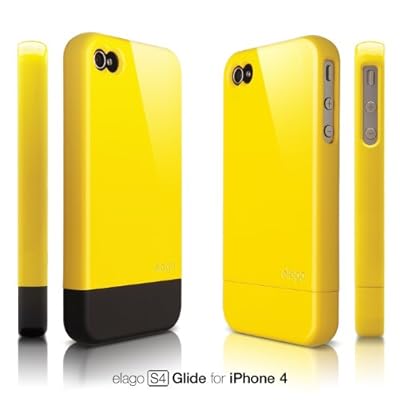
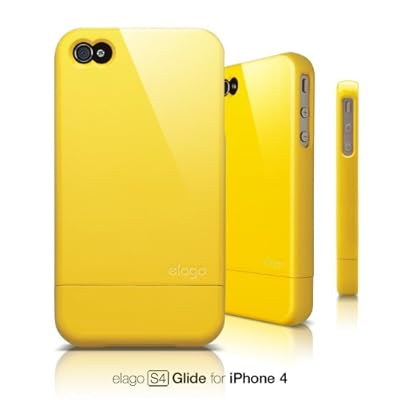
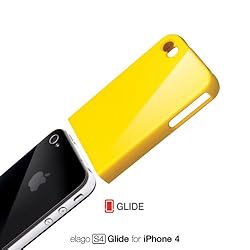
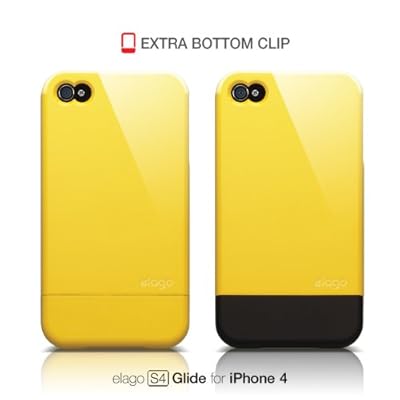
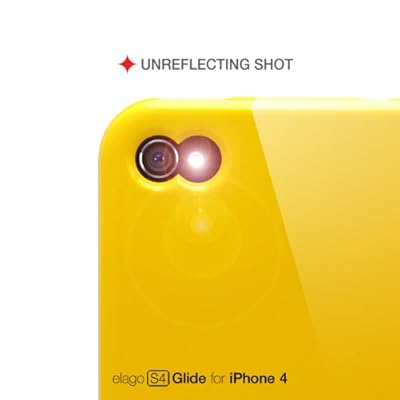
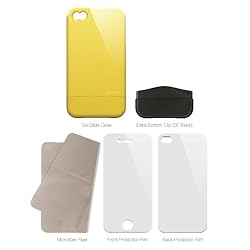
The Elago S4 Glide is a hard plastic slider for the iPhone 4 and iPhone 4S. The case features a two piece design that slides over the iPhone to protect against scratches. The case comes with two bottom pieces to add variety to the case's color. The case comes in many colors and can be arranged into over 100 different color combinations. The cases allows for easy access to all ports and features. To dock the iPhone simply remove the bottom section and insert the iPhone into the dock. The back of the case shows finger prints easily and will need frequent cleaning. The case does not add much bulk to the iPhone but will not withstand drops.The case comes with a front and back screen protector as well as a cleaning cloth. The Elago S4 Glide is good for people who need scratch protection but not ideal for people who are hard on their phone or allow their young children to use their device. The Elago S4 Glide retails for $24.99 from elagostore.com. Click read more below to view pictures and videos of the Elago S4 Glide.


Case was provided complimentary to the reviewer.


Wikisummarizer Adds Keyword Cloud

If you have ever played around with Wordle then you know just how much fun it is to see the keywords from a website jump out at you- visually showing you the topics that have been covered. I was very glad to receive an email from Henry Lewkowicz from Context Discovery that a Keyword Cloud feature has been added to Wikisummarizer. I gave it a try and searched on the term "Assistive Technology" to see how the Keyword Cloud feature would work. Wikisummarizer generated the Keyword Cloud very quickly and when I was done I copied the embed code that was supplied and pasted it into my blog for all of you to see. Works like a charm as you can see- so go give it a try and let me know what you think!


NoteControl - Taking Charge of Your Resources

With information coming at us at a frantic pace it is no wonder that we can quickly become overwhelmed. This is especially true for students who have a need to curate their notes and sources when writing research articles. Life was a lot easier for me when I was in school, there were simply books and journals, that I used to cite my works. Today students are faced with the myriad of Internet sources, books, journals, podcasts, and multimedia to keep account of when doing research. In this light, Matchware, recently released a new product NoteControl aimed at students to help them collect, collate, and sort notes when doing a written research paper. The coup de grace is the ability of NoteControl to output a perfectly formatted bibliography in many accepted and recognized formats (ie APA, MLA, Harvard to name a few.).

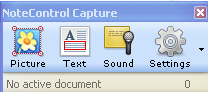
The premise of the program is quite simple-you create a notebook and then use the space to capture all of your notes which can include: Text, Picture, Sound, and Web notes. NoteControl allows the user to create a Folder structure to organize your notes and it is easy to move Notes that you capture from one folder to the next. For example, if you want to create a citation for text from a web site, you can simply go to the web site and highlight the text you want to use and then Click on the Text Note icon. This will bring up a note card with the text automatically included- you can change the name of the note card and once you click the Accept button your noted will be stored along with the source.You can use the same technique to capture graphics from websites or store needed  files (Word, PDF's) for your research project. If your computer has a microphone it is easy to store audio notes in your notebooks from within NoteControl.

Matchware has teamed up with WorldCat to enable users of NoteControl to access their large database of resources and collections from libraries around the world. Students are able within NoteControl to search the WorldCat database and have the citation automatically filled out with all of the necessary information for a properly formatted entry. If you have all of the information for a citation you can also manually add a citation to your research Notebook. Students will find the WorldCat tool a very handy tool to use for doing research and will find it even easier when it is time to generate the bibliography.

After you have collected your notes and resources NoteControl really shines when it is time to export all of your notes and create your bibliography. With one click of the mouse NoteControl lets you export your source listing, notes and bibliography directly to Word. NoteControl will export your notes and bibliography to any one of several formats including APA, Chicago, and MLA styles. The bibliography is perfectly formatted saving you the time an effort to manually recreate it once your paper is completed. You will find NoteControl an easy to use tool that is ideal for high school and college students who are writing research papers. As students begin to utilize more and more Internet resources they will find NoteControl and ideal tool to take charge and organize their resources for use in their papers. For those students who have access to MindView 4 and want to see their notes and resources in a mind map you can export them directly from NoteControl. Overall, NoteControl is an easy to use program that delivers on its promise to provide students a way to organize, sort and curate notes for research papers and projects. A one year subscription to NoteControl is prices at $49 dollars and at this time is only available for computers running Windows OS. There is a trial version of NoteControl available for student to try out which I would highly suggest. At $49 dollars for a year, NoteControl is good value and another tool that you should have your students take a look at to help tame the paper tiger when it comes time to write that research paper. It would be great if Matchware could add Text to Speech (TTS) supports within NoteControl for students that benefit from this type of support. NoteControl also allows students to work on collaborative projects across the web which adds value to this fine product. Give it a try and let me know what you think.

New iTunes U App: Perfect for Students and Educators

Today, Apple announce a new iTunes U App for iPad, iPhone and iPod Touch. To download the free app click here. The app allows students view classes, slide shows, documents and more from their classes. iTunes U also allows teachers to post assignments, video or audio of classes, slide shows, documents and more for uses by their students. iTunes U allows users to participate in classes from top university and organizations regardless of if the users attends the school. iTunes U can now be used by K-12 schools as well as universities. All classes are free to the public on iTunes U. iTunes U allows students to view and check off assignments, take notes and review missed classes. Apple describes the app as,

"Whether you’re taking a European history course in your spare time, learning Spanish in high school, or majoring in molecular biology at a university, you now have a powerful tool to help you get the most out of your classes. The new iTunes U app expands the classroom experience by putting all the materials for a course — audio and video, new iBooks Textbooks for iPad and other books, a syllabus and class assignments, posts from the instructor, PDFs, presentations, and more — just a tap away on your iPad, iPhone, or iPod touch."
Apple also says how iTunes you keeps you current, 
"When you take an iTunes U course, you’ll always have the most current information at your fingertips. With a tap, you can listen again to the most recent lecture or review the latest presentation to make sure you got all the details. Stay on top of your assignments and check them off as you complete them. And when an instructor sends a message or creates a new assignment, you’ll receive a push notification with the new information."
Click read more below to view additional pictures of the new iTunes U app.


Apple Announces iBooks 2 with Textbook Support


Today, Apple announced iBooks 2 with textbook support. The textbooks will be interactive and can include videos, Keynote presentations, 3D diagrams and more. Apple says that digital textbook on the iPad have many advantages of paper textbooks including ease of carrying to and from class, ability to update books and improve note taking. To download iBooks 2 click here. Textbooks will cost no more than $14.99. The textbooks will only be compatible with the iPad and will not work on iPhone or iPod Touch. The text books will be compatible with accessiblity features built into iOS 5. Click here to learn more about iOS 5 Accessiblity. Apple says,

"A Multi-Touch textbook on iPad is a gorgeous, full-screen experience full of interactive diagrams, photos, and videos. No longer limited to static pictures to illustrate the text, now students can dive into an image with interactive captions, rotate a 3D object, or have the answer spring to life in a chapter review. They can flip through a book by simply sliding a finger along the bottom of the screen. Highlighting text, taking notes, searching for content, and finding definitions in the glossary are just as easy. And with all their books on a single iPad, students will have no problem carrying them wherever they go."
The new textbooks will be easy to annotate. Students can easily highlight passages and add notes. A cool feature called study cards will make flash cards from your notes and highlights for easy studying. Apple says the following about study cards,
"All your notes and highlights automatically appear on study cards. Flip them over and find the definition of a glossary term or the note attached to the highlighted passage. Choose which highlight colors to review, and include chapter vocabulary from the glossary — automatically. To make sure you really know your stuff, you can shuffle your cards to study."
Apple will be partnering with Houghton Mifflin Harcourt, McGraw Hill and Pearson at the beginning. Apple also announced iBook Author which allows individuals to create textbooks for the iPad. Click read more below to view more images of iBooks 2 Textbooks.


"Use a finger as a highlighter when reading any textbook in iBooks. Just swipe over text and it’s highlighted. Tap a highlighted section and a palette appears. Change colors, switch to underlining, or add a note instantly. Then switch to the Notes view to see all your notes and highlights organized in one place, making it a cinch to search or go back to the highlighted sections of the book." - Apple.com